July 6, 2021 . 6 MIN READ
When you are building an online store, one of the key decisions that impact your growth is the choice of the eCommerce platform. Magento is an open-source software and is one of the oldest and largest eCommerce platform providers. It allows you to customize to your heart’s content.
But managing a store on Magento is like handling a beast. With it’s limited customer support, it’s near impossible to optimise and grow a business without professional help. The learning curve is quite steep and hence you find yourself spending more time in handling the technical side of things than actually selling. This impacts your growth and if not acted upon, the impact could hurt the business big-time.
Thankfully, there are some top rated proprietary software like Shopify, Bigcommerce and Volusion which you can migrate to. These platforms do the technical heavy lifting for you. As the world’s fastest growing ecommerce platform, Shopify provides an eCommerce platform that is refreshingly Do-it-Yourself (DIY). Along with a fantastic customer support, Shopify also provides a good collection of well designed and mobile friendly themes which can get your store up in no time.
Migrating to a new store is something you want to get right first time as there are lots of data to move securely and efficiently. In this post, I will walk you through all the steps you need to take to ensure a smooth migration from Magento to Shopify. To help you navigate, here’s a list of topics I will cover:
Let’s get started.
Before any migration, make sure you have full admin access to both Magento and Shopify stores. It’s a must to have a full backup of your Magento store. In rare cases, the migration may not go as per plan and a backup comes in handy to minimize the repercussions.
Here’s a comprehensive step-by-step guide to backup a Magento store: tutorial + script from Amasty – one of the top Magento experts. Due to the need to work with code, I advise you to take the help of a developer during the backup.
Next is to take stock and decide on the entities you want to migrate. What type of data do you want to migrate? Along with products and customers information, do you want order history and status to move over as well?
Products and Customers can be migrated manually from Magento to Shopify. But if you want to migrate Order status and related info, you would need a third party app like Cart2Cart. We will look at the tools later in the post when we discuss steps during migration. .
Now that you have the requirements listed and backup is completed, let’s create a fresh instance of your new Shopify store.
Go to http://www.shopify.com/ and enter your email address to get started. The setup process for a new Shopify store is super easy and it’s 14-day Free Trial is just what you need to start the migration.
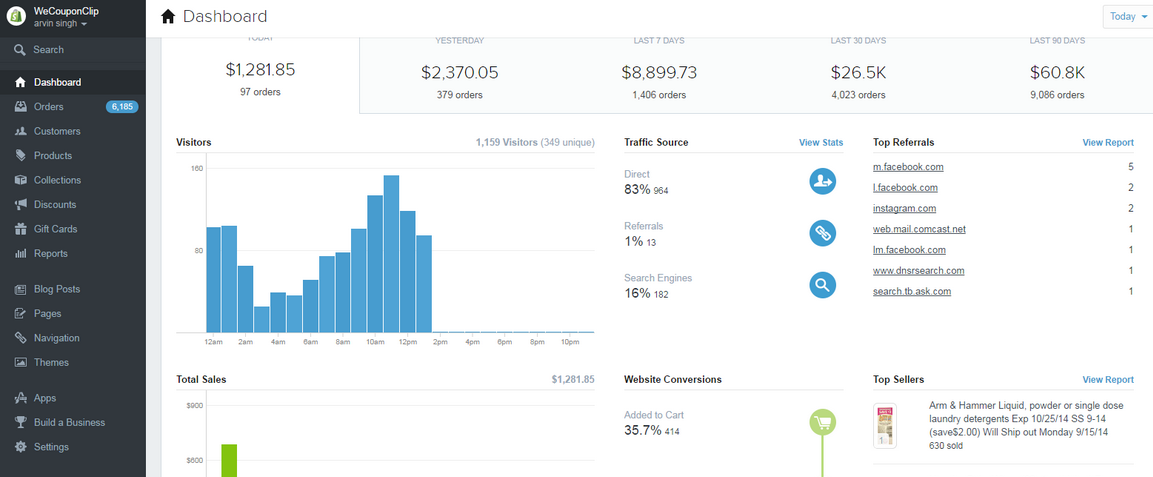
If you are new to Shopify, you have a refreshingly pleasant experience waiting for you. Here’s a look at the one-stop dashboard which gives you quick access to all key data like products and customers:
That’s it, you are all set to start migrating data from your Magento store to your brand new Shopify store.
It is recommended to use a highly rated third party tool like Cart2Cart to migrate data than doing it manually (by exporting and importing). If you are a growing or large store, you will have lots of entities and orders history that is crucial to keep track of. There are tools like Cart2Cart and Shopify’s ownMagento Importer for migrating your store from Magento to Shopify.
Here are 5 reasons why you should invest in a third party tool to migrate:
i. No need for coding. The migration process is fully automated. The tools are built by a team of highly qualified engineers.
ii. The migration tools give you the ability to run a risk-free demo migration. It is the best way to check if the sample data is migrating as you want it.
iii. The entities are migrated comprehensively in a single migration process. Entities supported include products, customers, order history and discount codes.
iv. You will have access to the professional support team from the third party service. It’s a must if you have specific requirements regarding migrating from Magento to Shopify.
v. If you are a large store processing 1000s of orders/month, you have a lot at stake when migrating. In such cases, a ‘migration insurance’ comes in handy. So in the rare instance of data corruption or unwanted results of migration, you can reset and restart the migration.
Our top choice is Cart2Cart. It is a top-rated automated shopping cart migration service. It allows store owners to migrate all products, product categories, manufacturers, customers, orders and other data from Magento to Shopify.
Let’s get the pricing concern out of the way. To give you an estimate, it costs around $110 (one-time fee) for a store having 100 Products, 1000 Customers and 1000 Orders to migrate from Magento to Shopify.
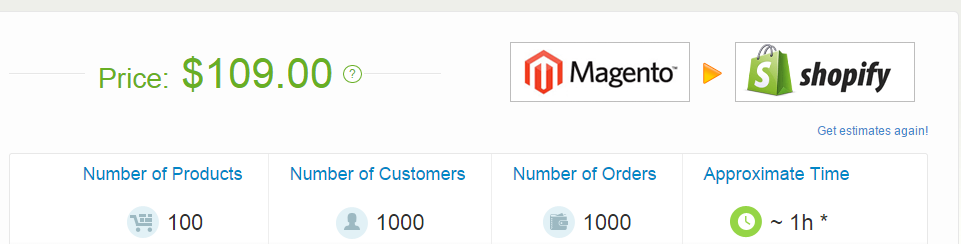
You can calculate an estimated cost for your specific migration by clicking here and entering respective values.
Here’s a glimpse at the type of data and entities you can migrate using Cart2Cart service (Starter plan):
The tool is super easy to use. The Cart2Cart team offers you live chat support to answer any queries and if needed, puts you in touch with an expert to walk you through the steps.
To help you test the migration, Cart2Cart provides you a free demo migration.
Here’s a step-by-step walkthrough video showing the migration from Magento to Shopify using Cart2Cart:
Migrating is not just about moving data from one platform to another. You also need to ensure that your brand, design and layout is optimised for a new platform like Shopify. That’s when design and migration experts can ensure a smooth transition.
WeMakeWebsites, Shopify Builder and MyShopifyConsultants are community favourites.
When migrating from Magento to Shopify, you need to take every precaution to make sure your data arrives safely and securely in Shopify. Do not rush and go through the process step-by-step. Here are some top guidelines and precautions to take:
Once you have completed your migration to Shopify, your focus should be to optimise your SEO, on-site conversion and branding. I am a huge fan of Shopify’s support team. They will assist you in your setup and even provide advice on using the right tools to grow your store.
If done right, the migration can improve your sales by a huge factor. Get inspired by the story of how Right Channel Radios improved their on-site conversion by 41%. The conversion from their mobile site went up by 110%! Read the full case study here: Migrating to Shopify from Magento: The Results of our $50,000 Redesign
Hope this guide helped you to plan your migration and you got some top tips to ensure a smooth and secure migration from Magento to Shopify. I’m more than happy to answer any questions or thoughts in the comments below.