February 14, 2023 . 8 MIN READ
Read this article to find out how an AWS cloud with your Magento store can cope with problems related to:
AWS (Amazon Web Services) is a cloud platform – a place where you can install your growing e-commerce business. Amazon is responsible for hardware, software and infrastructure management here.
The end-user can choose from a number of services which they can use, among others, to tackle the challenge that is the dynamic growth and increase in turnover of an online store.
Practically everything. In this article, however, I will focus on several factors that are the most important for dynamically developing large e-commerce Magento-based businesses.
I will describe those of AWS services that, by solving specific hosting-related problems, will make a real change in the quality of your store’s operation.
A secure online store is a place where no blind spots are left that might threaten the entire system’s stability.
AWS provides several solutions that support these incredibly important aspects. Here are some problems to which AWS offers solutions.
Solution:
Before you start installing Magento, determine who will have access to the AWS account. The service Identity and Access Management (IAM) will help you do that. With this service, you will be able to add users, group them and give specific permissions to each group.
Using groups requires some additional work in the beginning, but this will pay off the sooner the more users will be granted access to the account. Adding a new user, you won’t have to create new scripts or give permissions manually, because assigning a user to particular groups will automatically result in granting them particular permissions.
Solution:
With IAM, you can enforce using 2FA (Two-Factor Authentication) by all users, which will result in improved security of logging in.
Solution:
If you manage a large number of accounts, you might want to look into the Key Management Service (KMS). You can use it to store your symmetric and asymmetric keys, which, in turn, can be used, among others, to encrypt your drives, snapshots or secure access to your machines.
Solution:
A DDoS (Distributed Denial of Service) attack is an attack on a computer system or a network service.
Its purpose is to disrupt operations by overwhelming all resources that the target has available. Such an attack is carried out from multiple computers simultaneously; typically, these are machines which have been overtaken before.
After completing the initial configuration of Magento, it is worth using the following two protection services: AWS Shield and AWS Web Application Firewall (WAF).
The former is available in the basic, free version (Shield Standard) or an advanced, paid version (Shield Advanced); both versions prevent DDoS attacks on the network and transport layer.
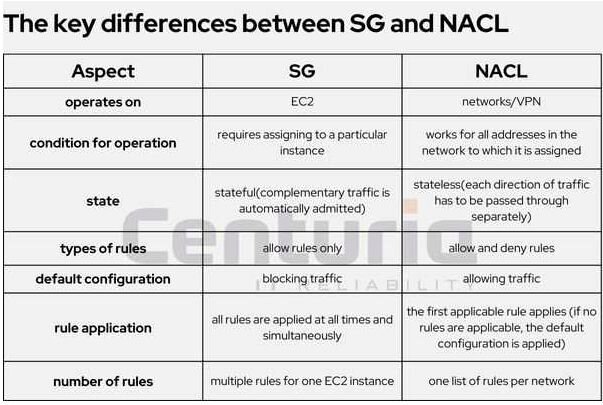
One of the first stages of the initial configuration of the environment is adjusting the new VPC (Virtual Private Cloud) to the architecture of the implemented solution. At this point, you need to remember to adequately configure two VPC services – Security Groups (SG) and Network Access Control List (NACL).
Using only Security Groups may seem sufficient, however, to fully secure the new environment, you will also need NACLs (for instance because there exists a risk that, configuring a new instance, one might forget to secure it with specific SG rules, and after adding the virtual machine to a particular network, the NACL rules assigned to it will immediately apply to it).
The key differences between SG and NACL are presented in the below table:
Problems with the performance of Magento-based stores manifest primarily as slowed-down loading of pages, especially with respect to those in the cache. This may occur after new functions are added to the store. How does AWS solve issues related to Magento store performance?
Solution:
What is of help here is one of the greatest advantages of public clouds – you can quickly scale your instances.
In other words, directly before launching, you can scale virtual machines (VM) vertically, that is, you can increase the resources assigned to them, and during launch, you can monitor their use in CloudWatch, adjusting their amount to your needs. Benefit: you use up exactly as much space on the server as you currently need. You do not pay for unused infrastructure, which will help you optimise costs.
It might be useful to save some space in case of an unforeseen increase in traffic. You can also scale your environment horizontally, that is, create more machines in advance.
It depends on the circumstances. Above all, it depends on the nature of your increased needs (occasional peaks, special offers, organic growth). Implementing horizontal scaling takes relatively much effort, while horizontal scaling takes only several minutes of downtime required to restart the virtual machine.
Solution:
For this purpose, it is worth using the free pricing calculator – AWS Calculator. It will help you verify the cost of particular solutions and entire environments even before you register. You can easily save and share the estimates created in the calculator with your partners.
High availability of your Magento store and resiliency
One sets up a Magento store with rapid growth in mind. Smooth scaling enables failure-free operation, which is essential for a profitable e-commerce business. When launching a Magento-based store, you should keep in mind that it will (potentially) multiply its size in the future.
Solution:
The above-mentioned vertical scaling has its limits, and carrying it out requires restarting your VM. If it is the only machine performing a given role, this means that you will have to schedule a maintenance break.
Knowing this, it is useful to design your environment in a way that a failure or maintenance in AWS does not mean the store disappearing from the web.
For this purpose, you may consider using the Elastic Load Balancer (ELB). After it is configured, the incoming traffic is distributed among the workers (machines processing the PHP code of Magento).
If your store enjoys greater popularity during promotional campaigns, you may want to test and implement the Auto Scaling Groups (ASG) mechanism, which enables automatic horizontal scaling (both ways).
To manage shared files (e.g. media), you can use the Elastic File Storage (EFS). This service is made in a way so that access to your files can be uninterrupted, without further involvement of programmers or administrators.
Solution:
You can install your database either on an EC2 instance or the Relational Database Service (RDS) – an AWS relational database service.
EC2 is a Linux virtual machine (VM), on which you can install whatever you need (in this case – a database). RDS, on the other hand, is a service managed by AWS.
The difference between the two lies in the issue of responsibility: for security, upgrades, version and other elements.
Here, one might ask whether cutting the cost (own EC2 database) is a proportional price for taking on this responsibility.
Failures and the ensuing loss of data may be the worst that may happen to a company whose core business is e-commerce. Luckily, AWS does not leave this problem without a solution.
Solution:
As you conduct the configuration of your environment, it is good to remember about backups. A service for monitoring the backed-up resources and policies centrally is AWS Backup.
How is it done? You determine what is backed up, how often and for how long is it stored. AWS provides the space for backups.
You have to pay for each snapshot, but it amounts to a smaller cost than that of an EBS drive of the same size. Within the service, you can additionally configure backups not only for virtual machines but also, for instance, for data from RDS, S3, DynamoDB or Storage Gateway.
Solution:
Another option which you might want to use is the cyclical snapshot mechanism. The configuration is simple and the service offers many options that enable maintaining a desired backup retention (a parameter determining the life of a backup, that is, the period for which it is stored).
Solution:
One of the best methods of protecting a database against loss and unavailability of data is database replication. What this solution covers is not only unauthorised availability but also breaks resulting from, for instance, AWS maintenance or problems with the instance itself (whatever the cause).
The RDS service features replication mechanisms native to the most popular database engines (such as MySQL or PostgreSQL).
Replication enables keeping live copies of your databases. The master database sends the changes it implements to the slave database, which then introduces them there.
By running your Magento store in the cloud, you solve several compliance-related issues, that is issues related to compliance with standards and standard practices.
Solution:
Thanks to AWS Config, you can track changes in the configuration of AWS resources. This tool provides an overview of all services attached to a given account. It is practical for taking inventory of these services.
It helps to determine the rules which should always be complied with on the account and to set appropriate notifications for when these rules are broken.
Solution:
Information on the activity of users with respect to the account’s resources is collected by CloudTrail. This service collects, among others, information on what account was used to authorise what action, when was this action performed and from what IP address. In this way, you can easily identify who and when made what changes to the account.
Solution:
A tool for auditing your environment and generating reports based on the obtained data is the Audit Manager.
Configuration of this tool involves either using the available tests or creating your own one, and verifying whether the environment fulfils all of the requirements of the selected standards (primarily those applicable in the USA).
Last but not least when it comes to running an online store is an issue of monitoring the active services.
Solution:
The basic tool for monitoring the use of resources in AWS and notifying of their use is CloudWatch.
Thanks to this tool, you will be able to monitor how the services purchased by your company are used and optimise their use in accordance with the received information. An example of such optimisation is changing the instances utilised to smaller ones.
Reference;
https://aws.amazon.com/getting-started/hands-on/magento-on-aws/
https://www.mgt-commerce.com/blog/magento-server-hosting-aws/
https://pandagroup.co/services/magento-aws-hosting/
https://towardsaws.com/magento-2-cloud-with-auto-scaling-on-aws-c43cfdc37f5a
https://github.com/Genaker/TerraformMagentoCloud
https://newrelic.com/pricing