

October 8, 2022 . 2 MIN READ
When using PuTTY to connect to Unix/Linux servers, you may occasionally encounter the following message:
PuTTY Fatal Error: Couldn’t agree a key exchange algorithm.
Interestingly, this error is often inconsistent; you might be able to SSH into some servers perfectly fine while being blocked from others. In this post, we’ll explain why this happens and how to resolve it quickly.
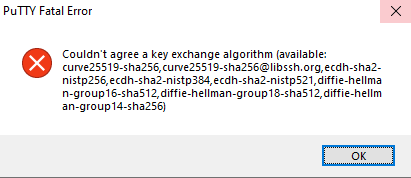
For a successful SSH connection, the client (PuTTY) and the server must agree on a common Key Exchange (KEX) algorithm to secure the communication. If there is no overlap between the algorithms supported by both sides, the connection fails.
This most commonly happens when you use an older version of PuTTY to connect to a modern Operating System (such as Ubuntu 22.04+, RHEL 9, or Debian 12). Modern servers disable older, vulnerable algorithms for security reasons, leaving an outdated PuTTY client with no “common language” to speak.
The most effective fix is to update your PuTTY client to the latest version. New releases include support for modern, secure algorithms like Curve25519 and Diffie-Hellman Group 14.
Uninstall or delete your current PuTTY executable.
Visit the official site to download the latest version: Download PuTTY.
Install and re-attempt the connection.
Pro-Tip: If you are unable to update PuTTY immediately due to system restrictions, you can sometimes fix this by going to Connection > SSH > KEX in the PuTTY settings and moving “Diffie-Hellman group exchange” to the top of the list, though updating remains the recommended path.
Reference:
https://www.theserverside.com/blog/Coffee-Talk-Java-News-Stories-and-Opinions/Putty-Key-Exchange-Algorithm-Couldnt-Agree-Error-Fatal-EC2-AWS-SSH
https://www.choudharysumit.com/2021/04/putty-fatal-error-couldnt-agree-key.html
The Couldn’t agree a key exchange algorithm is expected behavior with older version of PuTTy or PuTTy integrated solutions like WInSCP. To resolve this issue, upgrade PuTTy to a version to 0.65 or later from http://www.putty.org/










