
October 13, 2022 . 4 MIN READ
Introduction
The 524 Gateway Timeout error appeared while I was testing a machine learning application with Manuel Guzman, MSW’s R&D Director. The application required several minutes to generate predictions before returning results to the user.
During testing, we discovered that the request was timing out because of Cloudflare’s connection limit. Initially, many online resources suggested that this issue could not be resolved (including some discussions on Stack Overflow). However, after a brainstorming session, we managed to find a practical solution based on Manuel’s idea.
In this article, I’ll explain what the 524 Gateway Timeout error is, how it occurs, and the approach we used to successfully solve the problem. I’ll also share the code snippets that made the solution possible.
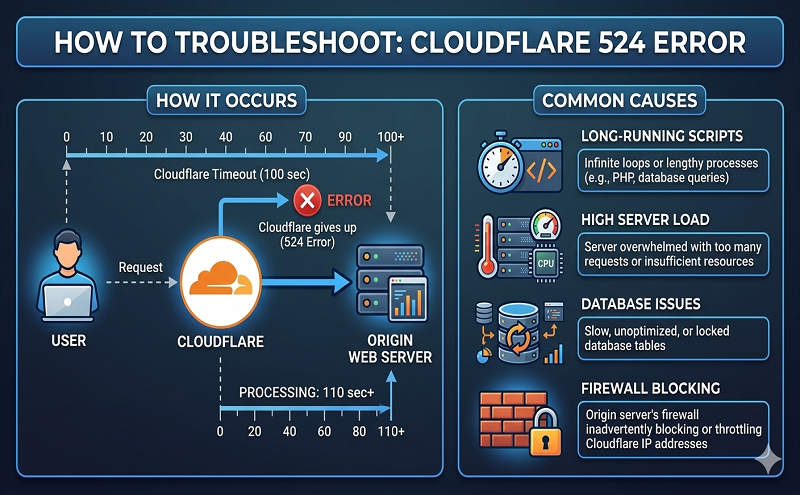
The 524 Gateway Timeout is an HTTP status code specific to Cloudflare. It occurs when Cloudflare successfully connects to the origin server but does not receive a response within the allowed time limit.
According to Cloudflare’s documentation:
Error 524 indicates that Cloudflare successfully connected to the origin web server, but the server did not return an HTTP response before the default timeout of 100 seconds. Enterprise customers can increase this timeout up to 600 seconds.
In a typical workflow, a browser sends a request to a web server hosting an application. The server processes the request and returns a response with a status code (such as 200 OK) along with the requested data.
However, if the server takes more than 100 seconds to respond, Cloudflare automatically closes the connection and returns a 524 error to the user with no content.
Cloudflare only allows the timeout value to be increased on Enterprise plans, which means other plans must use alternative approaches to handle long-running processes.
To avoid the timeout issue, we redesigned the workflow so the browser would not wait for the entire process to complete in a single request.
The solution works as follows:
The browser sends a request to start the backend process (in our case, a machine learning prediction task).
When the backend receives the request, it creates a unique identifier (ID) associated with that request.
The backend launches the prediction process using the provided parameters.
Instead of waiting for the prediction process to finish, the server immediately returns a response containing the request ID and a 202 status code, indicating that the task is still being processed.
Idx = str(uuid.uuid4())
if Idx not in dict_res:
dict_res[Idx] = {}
params = {
“Idx”: Idx,
“input_text”: input_text,
“extraction_model”: extraction_model,
“concept_label”: concept_label
}
extract_concepts_task = threadPoolExec.submit(extract_concepts, params)
extract_concepts_task.arg = params
extract_concepts_task.add_done_callback(reportDone)
return jsonify({“Idx”: Idx}), 202
Once the browser receives the response, it waits for a short period (for example, 10 seconds) before sending another request with the same ID to check whether the process has finished.
const formData = new FormData();
formData.append(‘data’, this.Idx)
axios.post(“/Extractor/Answer/”, formData, { useCredentials: true })
.then(res => {
console.log(res)
this.status = res.status
this.result = res.data
})
}
}
The backend checks whether the prediction process has completed. If it has, the server returns the final results.
If the prediction is still running, the browser continues polling until the results are available.
Machine learning applications often require significantly longer processing times compared to typical web applications. Because of this, standard server timeout limits can interrupt the response before results are ready.
A practical way to address this limitation is by implementing an asynchronous request pattern. Instead of waiting for a long-running process to complete, the server immediately returns a response with a task ID while the process continues in the background. The client then periodically checks for the result.
This approach helps avoid Cloudflare’s 524 timeout limit and ensures that users eventually receive the results once the backend process is complete.
Reference:
524 error cloudflare
https://support.cloudflare.com/hc/en-us/articles/115003011431-Troubleshooting-Cloudflare-5XX-errors#:~:text=Error%20524%20indicates%20that%20Cloudflare,100%20second%20connection%20timed%20out.
https://towardsdatascience.com/how-to-fix-a-cloudflare-gateway-timeout-error-in-a-flask-vue-js-ml-application-efe2826585bb










