July 8, 2021 . 1 MIN READ
I thought it might be useful to document how I secure the redmine appliance. I find this useful for private setups.
It was a little messier than I thought becase for some reason in the 11.3 version the apache port 80 and 443 configs point to the same file. Sometimes I want secure only access, sometimes both. It would be nice to have these separated, as that makes it easier to redirect the secure traffic.
1. copy /etc/apache2/conf/railsapp.conf to /etc/apache2/conf/railsapp_80.conf
2. Edit /etc/apache2/sites-available/railsapp, change the virtualhost *:80 include from
/etc/apache2/conf/railsapp.conf
to
/etc/apache2/conf/railsapp_80.conf
This makes it nice in webmin, as it will now distinguish the virtual servers. You can make the changes in /etc/apache2/sites-available/railsapp.
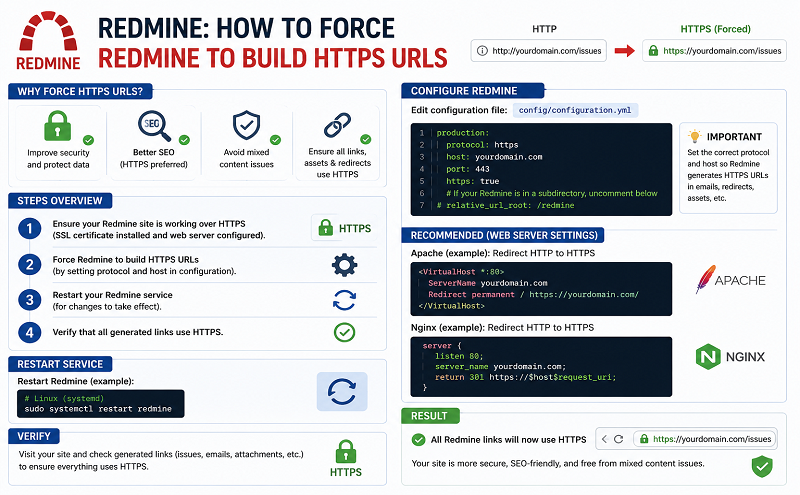
If you want redmine to be secure only,
3. edit /etc/apache2/conf/railsapp-80.conf
After the line
RewriteEngine on
Add
# force http to https
RewriteCond %{SERVER_PORT} !^443$
RewriteRule ^.*$ https://%{SERVER_NAME}%{REQUEST_URI} [L,R=permanent]
save the file and restart apache.
I’ve used this on a number of private setups, and it works.
Thank you TurnkeyLinux – I really like your appliance model.
https://www.turnkeylinux.org/forum/general/20120610/setting-redmine-under-https
http://www.faqforge.com/linux/controlpanels/how-to-redirect-an-http-connection-to-https-in-apache-webserver/