
July 14, 2021 . 3 MIN READ
https://phoenixnap.com/kb/how-to-rename-a-mysql-database
Introduction
As an administrator, you may need to change the name of a database. However, for security, the command to rename a database directly was removed in MySQL 5.1.23.
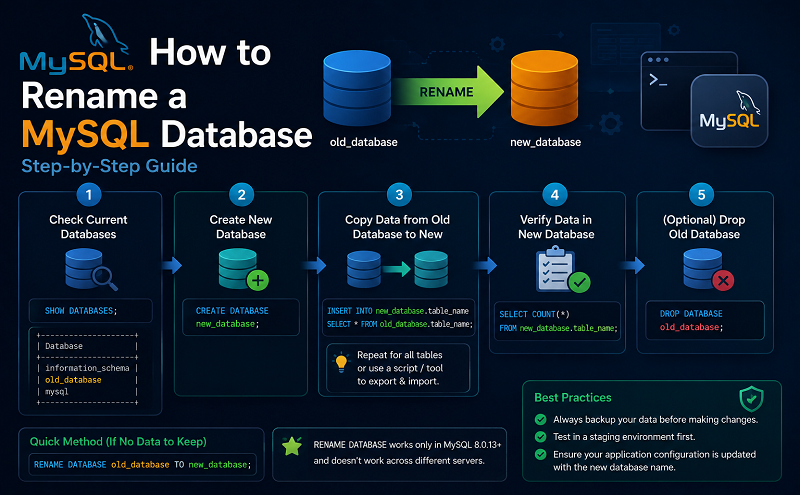
This guide provides three options to rename a MySQL database.
Prerequisites
Servers configured with cPanel offer the easiest way to rename a MySQL database.
If you’re working on a server that doesn’t support cPanel, you’ll need to create a new database and import the data.
mysqldump –u [UserName] –p[Password] –R [DB_Name] > [DB_Name].sql
Replace [UserName] and [Password] with the actual credentials for the database, and replace [DB_Name] with the exact name of the database you’re changing. There should be no space between -p and the password. The -R flag indicates that the dump file should retain all stored procedures and functions.
You may want to copy this file to a different location as a backup.
mysqladmin –u [UserName] –p[Pasword] create [New_DB_Name]
Note: Make sure the database name isn’t already in use.
mysql –u [UserName] –p[Password] [New_DB_Name] < [DB_Name].sql
mysqladmin -u [Username] –p[Password] drop [DB_Name]
It won’t hurt if you skip this step. However, it can help you keep a clean database environment.
The InnoDB storage engine is a feature included in all versions of MySQL since MySQL 5.5. It can be used to create a new database, then rename each table from the old database to the new database.
mysql –u [UserName] –p[Password] create [New_DB_Name]
Replace [UserName] with the database username, and [Password] with the password for that account. Replace [New_DB_Name] with any name you’d like.
mysql –u [UserName] –p[Password] [DB_Name] –sNe ‘show tables’ | while read table; do mysql –u [UserName] –p[PassWord] –sNe “RENAME TABLE [DB_Name].$table TO [New_DB_Name].$table”; done
The script above cycles through each table in the database and renames it. Provide your password in the script to avoid having to enter it for each cycle.
mysql –u [UserName] –p[Password]
Use the RENAME TABLE command to rename a table:
RENAME TABLE [DB_Name].[Table1] TO New_DB_Name.Table1;
Instead [Table1], type the name of a table in the existing [DB_Name] database. If you have more than one table in this database, you’ll need to repeat this action for each table.
Conclusion
By following this guide, you should now know how to rename a MySQL database.
When working with an older version of MySQL (5.1.7 and older), you may have the ability to use the RENAME DATABASE command. It is strongly recommended that you update your database for security and stability, and use the renaming methods in this guide.
I think the solution is simpler and was suggested by some developers. phpMyAdmin has an operation for this.
From phpMyAdmin, select the database you want to select. In the tabs there’s one called Operations, go to the rename section. That’s all.
It does, as many suggested, create a new database with the new name, dump all tables of the old database into the new database and drop the old database.










