
September 28, 2021 . 8 MIN READ
In a rush? Skip to tutorial steps.
What’s the first thing you do when you are looking for something?
If you’re like me, you probably pull out your phone and search for it on Google. It makes optimizing websites for search engines more important than ever. And as a developer, I get it, SEO is a critical part of any business’ online presence. It’s my job to be sure our tools can support that effort of being easily visible on search engine results pages.
And since React is the most popular JavaScript framework, these tools will most likely be related to it or React frameworks like Next.js.
But, how can we be sure our React dynamic applications are SEO-friendly for our favorites robot crawlers to understand?
That’s when the real work comes in. Stop googling: “SEO with react” ’cause you’re are at the right place to get started, my friends!
It’s exactly what we’ll explore today. How Next.js can help give an SEO boost to our React-powered SPA.

In this article, I’ll walk through the following:
What’s a SPA?
What are the challenges with SPA SEO?
Why is SEO important?
What is Next.js?
How to get started building SEO-friendly React apps with Next.js?
For more tech-agnostic info about single-page application SEO, check out this in-depth guide.
A SPA (or Single Page Application) is a type of web application that provides a dynamic and interactive experience all from one point of entry.
Traditionally, you might be more familiar with a server-side approach, where each page of your website has its own “route” (or page URL), but with a SPA, you have a single route that loads up the entire website in the browser using JavaScript.
It’s a little easier to get your head around it with an example. If you’re building a React application, React needs to “mount” onto a page element. You can do this by serving a page like index.html to your visitor, then in the browser, React will provide that mounting action based on your instructions.

Once that page mounts, React kicks in and enables you to do whatever you want. Whether it’s providing simple things for the visitor to interact with or providing some routing mechanism to change pages, in this example, that entire experience originated from that single page.
Part of the issue of serving an entire application based on a single entry point (index.html) is when Google is trying to look at that URL, they’re only ever going to be able to see the content and metadata from that single initial page.
This limits what pages you can make available to Google, ultimately hurting your ability to index more content. It’s that indexed content that makes your website or application discoverable by search engines.
Also, traditionally, a single-page application leans heavily on JavaScript to provide a dynamic experience. For many simple use cases, this might be completely fine, as Google can support a limited amount of JavaScript when crawling the page, but this isn’t true of all search engines.
With these challenges, we start to lose our competitive advantage when trying to make use of one of the biggest potential traffic sources on the web.
SEO (Search Engine Optimization) is the practice of helping search engines more easily read and understand what your website or application is about.
This is critical if your goal is to bring as many people as you can to your website. The goal of people researching on the internet is to ultimately find something, and that something can be your business or the content you’re trying to promote. More traffic (visitors) means more potential sales (or customers) for your business.

Search engines are constantly getting smarter, with hardworking teams at Google, Bing, Duck Duck Go, and other engines constantly fine-tuning search algorithms. But we wouldn’t need to write this article if they were perfect. While they might be able to figure out what your blog post is broadly about or what types of products your business sells, it’s limited by what information you provide and how you provide it.
If you’re solely relying on a SPA that is hard to crawl and doesn’t give much information on that first and only page that Google can see, you’re missing out on potential opportunities. People could have found your content instead of your competitors when searching.
The awesome thing about the web is that not only are search engines getting smarter, but the tools we can use as developers are becoming more mature. It gives us ways to solve our SEO needs without sacrificing any functionality that makes a SPA great.
Next.js is a web framework that sits on top of React, providing a bunch of features out of the box that can take our applications to another level.

In the example of our traditional SPA, we had a single index.html file. React would mount the application in the browser and handle any interactions and page navigation in that file.
A different approach would be to have .html files for all of our pages. For each visited page, React would mount the application and content for that particular page (e.g., About page, Contact page) rather than loading from the initial homepage.
To do that, Next.js has a few different techniques and APIs that developers can interface with to make sure we’re providing as much SEO value as we can.
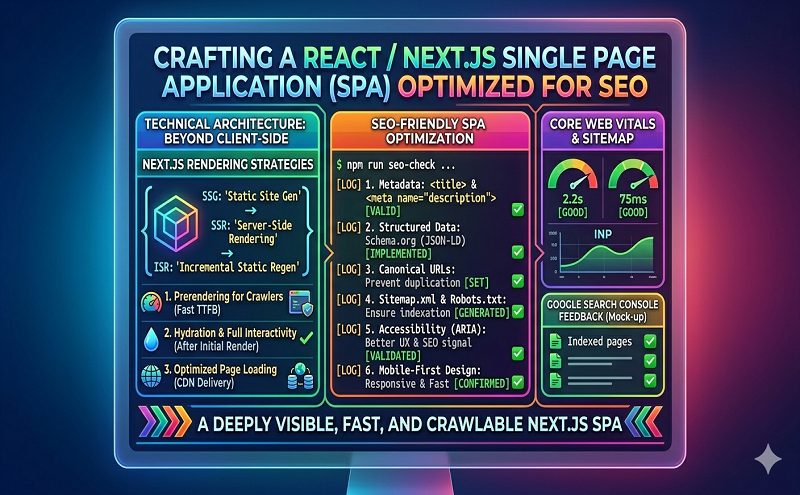
Static Site Generation (SSG) is the practice of pre-rendering some or all of the pages of a website/application ahead of the browser at compile time. The index.html would include most, if not all, of the experience that will get loaded in the browser.
This works wherever the website or application is compiled from, that server or environment will bring in any data sources and use React to build the website just like it would inside the browser, but export it into an HTML file. This file would then get served to the visitor.
React would still “hydrate” the page and provide the ability to add a more dynamic experience. However, by pre-rendering, you’re able to reduce the amount of work the browser has to do to get your visitor the experience you want to give them.
Each of these pages is located in individual “routes,” like mentioned before. Visitors, or in our case, search engine crawlers, would then be able to go directly to the page and see the content specific to that page.
This means that not only can we have page-specific metadata, like a title and description, but the search engine can also read and understand that page’s content and recommend it to people based on their searches.
Nevertheless, rendering pages at compile time comes with its limitation. The information that can be sent immediately to the browser is limited because of its static nature. While we can still load that dynamically in the browser, some use cases may need a completely dynamic experience that could be challenging to accomplish.
Server-side Rendering (SSR) provides a similar concept to Static Site Generation. Still, instead of compiling each page ahead of time into static files, that experience will be rendered by React at request time. For instance, if your visitor is trying to visit the Contact page (/contact), the server will recognize the route that is being visited, fetch all information related to that page, compile the HTML, and return it as part of the initial response.
Similar to SSG, using this technique, you can leverage the ability to provide page-specific information and context to both our visitors and search engines. This way, we make sure our content is as searchable as it can be.
While both options work well for providing good SEO, there are some tradeoffs with SSG and SSR. We won’t get into this article, but it should be considered when making the decision for your website or application.
Regardless of the option you choose, a challenging part of using tools like React for building a web page is that these applications get mounted into the of an HTML page. This means that you don’t have direct access, without additional tools, to make any changes to places like the of a website. It’s traditionally where a lot of key metadata lives for describing your content to search engines.
This includes things like your title, description, and any Open Graph data:
<title>Add a Shopping Cart to Any Website in Minutes - Snipcart</title>
<meta name="description" content="Add a shopping cart to your site in minutes. Works with any site builder, CMS, and framework. 20 000+ merchants trust our e-commerce solution for their website. Join them!">
<meta property="og:title" content="Add a Shopping Cart to Any Website in Minutes - Snipcart">
<meta property="og:description" content="Add a shopping cart to your site in minutes. Works with any site builder, CMS, and framework. 20 000+ merchants trust our e-commerce solution for their website. Join them!">
<meta property="og:url" content="https://snipcart.com/">
<meta property="og:type" content="website">
Luckily, Next.js ships with a Head component out of the box that we can leverage to make sure all of our pages include those important details that need to get rendered into our page.
You can first import the head component to make it work, then include it as a child of a Next.js page. You can then add anything you want to the Head.
function IndexPage() {
  return (
    <div>
      <Head>
        <title>Add a Shopping Cart to Any Website in Minutes - Snipcart</title>
        <meta name="description" content="Add a shopping cart to your site in minutes. Works with any site builder, CMS, and framework. 20 000+ merchants trust our e-commerce solution for their website. Join them!">
        <meta property="og:title" content="Add a Shopping Cart to Any Website in Minutes - Snipcart">
        <meta property="og:description" content="Add a shopping cart to your site in minutes. Works with any site builder, CMS, and framework. 20 000+ merchants trust our e-commerce solution for their website. Join them!">
        <meta property="og:url" content="https://snipcart.com/">
        <meta property="og:type" content="website">
      </Head>
Next.js will recognize that metadata and do the hard work of lifting it up to the right location in your HTML document when the page is being rendered.
This lets us end up with both the power of dynamic React pages and the ability to craft that information for Google carefully!
Resource: https://snipcart.com/blog/react-nextjs-single-page-application-seo
Read more: https://stackoverflow.com/questions/64132884/next-js-is-it-possible-to-do-ssr-only-for-google-bot-and-other-crawlers-not-fo
https://www.toptal.com/react/react-seo-best-practices
https://snipcart.com/blog/react-nextjs-single-page-application-seo
https://medium.com/@SeoJaeDuk/search-engine-optimization-in-react-next-js-875c3587e782
https://medium.com/@PhilipAndrews/the-real-world-effect-of-nextjs-on-seo-2882cbc9aed3
npmjs.com/package/next-seo
https://medium.com/eincode/learn-how-next-js-improves-seo-dae1441e276b
https://prismic.io/blog/seo-with-react-and-nextjs










