July 13, 2021 . 10 MIN READ
https://docs.aws.amazon.com/AWSEC2/latest/UserGuide/ri-modifying.html#ri-modification-instancemove
When your needs change, you can modify your Standard or Convertible Reserved Instances and continue to benefit from the billing benefit. You can modify attributes such as the Availability Zone, instance size (within the same instance family), and scope of your Reserved Instance.
You can also exchange a Convertible Reserved Instance for another Convertible Reserved Instance with a different configuration. For more information, see Exchange Convertible Reserved Instances.
You can modify all or a subset of your Reserved Instances. You can separate your original Reserved Instances into two or more new Reserved Instances. For example, if you have a reservation for 10 instances in us-east-1a and decide to move 5 instances to us-east-1b, the modification request results in two new reservations: one for 5 instances in us-east-1a and the other for 5 instances in us-east-1b.
You can also merge two or more Reserved Instances into a single Reserved Instance. For example, if you have four t2.small Reserved Instances of one instance each, you can merge them to create one t2.large Reserved Instance. For more information, see Support for modifying instance sizes.
After modification, the benefit of the Reserved Instances is applied only to instances that match the new parameters. For example, if you change the Availability Zone of a reservation, the capacity reservation and pricing benefits are automatically applied to instance usage in the new Availability Zone. Instances that no longer match the new parameters are charged at the On-Demand rate, unless your account has other applicable reservations.
If your modification request succeeds:
If your modification request fails, your Reserved Instances maintain their original configuration, and are immediately available for another modification request.
There is no fee for modification, and you do not receive any new bills or invoices.
You can modify your reservations as frequently as you like, but you cannot change or cancel a pending modification request after you submit it. After the modification has completed successfully, you can submit another modification request to roll back any changes you made, if needed.
Contents
You can modify these attributes as follows.
| Modifiable attribute | Supported platforms | Limitations |
|---|---|---|
| Change Availability Zones within the same Region | Linux and Windows | – |
| Change the scope from Availability Zone to Region and vice versa | Linux and Windows | If you change the scope from Availability Zone to Region, you lose the capacity reservation benefit.
If you change the scope from Region to Availability Zone, you lose Availability Zone flexibility and instance size flexibility (if applicable). For more information, see How Reserved Instances are applied. |
| Change the instance size within the same instance family | Linux/UNIX only
Instance size flexibility is not available for Reserved Instances on the other platforms, which include Linux with SQL Server Standard, Linux with SQL Server Web, Linux with SQL Server Enterprise, Red Hat Enterprise Linux, SUSE Linux, Windows, Windows with SQL Standard, Windows with SQL Server Enterprise, and Windows with SQL Server Web. |
The reservation must use default tenancy. Some instance families are not supported, because there are no other sizes available. For more information, see Support for modifying instance sizes. |
| Change the network from EC2-Classic to Amazon VPC and vice versa | Linux and Windows | The network platform must be available in your AWS account. If you created your AWS account after 2013-12-04, it does not support EC2-Classic. |
Requirements
Amazon EC2 processes your modification request if there is sufficient capacity for your new configuration (if applicable), and if the following conditions are met:
You can modify the instance size of a Reserved Instance if the following requirements are met.
Requirements
t2 to t3, whether you use the same size or a different size.You cannot modify the instance size of Reserved Instances for the following instances, because each of these instance families has only one size:
cc2.8xlargecr1.8xlargehs1.8xlarget1.microContents
Each Reserved Instance has an instance size footprint, which is determined by the normalization factor of the instance size and the number of instances in the reservation. When you modify the instance sizes in an Reserved Instance, the footprint of the new configuration must match that of the original configuration, otherwise the modification request is not processed.
To calculate the instance size footprint of a Reserved Instance, multiply the number of instances by the normalization factor. In the Amazon EC2 console, the normalization factor is measured in units. The following table describes the normalization factor for the instance sizes in an instance family. For example, t2.medium has a normalization factor of 2, so a reservation for four t2.medium instances has a footprint of 8 units.
| Instance size | Normalization factor |
|---|---|
| nano | 0.25 |
| micro | 0.5 |
| small | 1 |
| medium | 2 |
| large | 4 |
| xlarge | 8 |
| 2xlarge | 16 |
| 3xlarge | 24 |
| 4xlarge | 32 |
| 6xlarge | 48 |
| 8xlarge | 64 |
| 9xlarge | 72 |
| 10xlarge | 80 |
| 12xlarge | 96 |
| 16xlarge | 128 |
| 18xlarge | 144 |
| 24xlarge | 192 |
| 32xlarge | 256 |
| 56xlarge | 448 |
| 112xlarge | 896 |
You can allocate your reservations into different instance sizes across the same instance family as long as the instance size footprint of your reservation remains the same. For example, you can divide a reservation for one t2.large (1 @ 4 units) instance into four t2.small (4 @ 1 unit) instances. Similarly, you can combine a reservation for four t2.small instances into one t2.large instance. However, you cannot change your reservation for two t2.small instances into one t2.large instance because the footprint of the new reservation (4 units) is larger than the footprint of the original reservation (2 units).
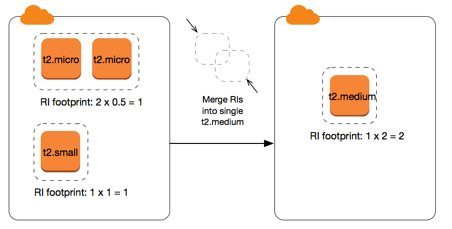
In the following example, you have a reservation with two t2.micro instances (1 unit) and a reservation with one t2.small instance (1 unit). If you merge both of these reservations to a single reservation with one t2.medium instance (2 units), the footprint of the new reservation equals the footprint of the combined reservations.
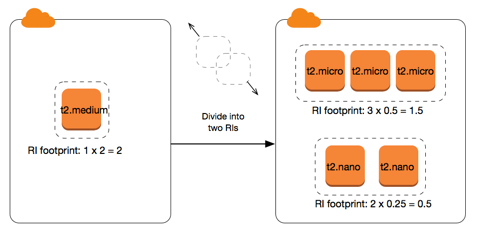
You can also modify a reservation to divide it into two or more reservations. In the following example, you have a reservation with a t2.medium instance (2 units). You can divide the reservation into two reservations, one with two t2.nano instances (.5 units) and the other with three t2.micro instances (1.5 units).
You can modify a reservation with metal instances using other sizes within the same instance family. Similarly, you can modify a reservation with instances other than bare metal instances using the metal size within the same instance family. Generally, a bare metal instance is the same size as the largest available instance size within the same instance family. For example, an i3.metal instance is the same size as an i3.16xlarge instance, so they have the same normalization factor.
The following table describes the normalization factor for the bare metal instance sizes in the instance families that have bare metal instances. The normalization factor for metal instances depends on the instance family, unlike the other instance sizes.
| Instance size | Normalization factor |
|---|---|
a1.metal |
32 |
m5zn.metal | z1d.metal |
96 |
c6g.metal | c6gd.metal | i3.metal | m6g.metal | m6gd.metal | r6g.metal | r6gd.metal | x2gd.metal |
128 |
c5n.metal |
144 |
c5.metal | c5d.metal | i3en.metal | m5.metal | m5d.metal | m5dn.metal | m5n.metal | r5.metal | r5b.metal | r5d.metal | r5dn.metal | r5n.metal |
192 |
u-*.metal |
896 |
For example, an i3.metal instance has a normalization factor of 128. If you purchase an i3.metal default tenancy Amazon Linux/Unix Reserved Instance, you can divide the reservation as follows:
i3.16xlarge is the same size as an i3.metal instance, so its normalization factor is 128 (128/1). The reservation for one i3.metal instance can be modified into one i3.16xlarge instance.i3.8xlarge is half the size of an i3.metal instance, so its normalization factor is 64 (128/2). The reservation for one i3.metal instance can be divided into two i3.8xlarge instances.i3.4xlarge is a quarter the size of an i3.metal instance, so its normalization factor is 32 (128/4). The reservation for one i3.metal instance can be divided into four i3.4xlarge instances.Before you modify your Reserved Instances, ensure that you have read the applicable restrictions. Before you modify the instance size, calculate the total instance size footprint of the original reservations that you want to modify and ensure that it matches the total instance size footprint of your new configurations.
To modify your Reserved Instances using the AWS Management Console
If your Reserved Instances are not in the active state or cannot be modified, Modify Reserved Instances is disabled.
To modify your Reserved Instances using the command line
processing, fulfilled, or failed), use one of the following commands:
If the target configuration settings that you requested were unique, you receive a message that your request is being processed. At this point, Amazon EC2 has only determined that the parameters of your modification request are valid. Your modification request can still fail during processing due to unavailable capacity.
In some situations, you might get a message indicating incomplete or failed modification requests instead of a confirmation. Use the information in such messages as a starting point for resubmitting another modification request. Ensure that you have read the applicable restrictions before submitting the request.
Not all selected Reserved Instances can be processed for modification
Amazon EC2 identifies and lists the Reserved Instances that cannot be modified. If you receive a message like this, go to the Reserved Instances page in the Amazon EC2 console and check the information for the Reserved Instances.
Error in processing your modification request
You submitted one or more Reserved Instances for modification and none of your requests can be processed. Depending on the number of reservations you are modifying, you can get different versions of the message.
Amazon EC2 displays the reasons why your request cannot be processed. For example, you might have specified the same target configuration—a combination of Availability Zone and platform—for one or more subsets of the Reserved Instances you are modifying. Try submitting the modification requests again, but ensure that the instance details of the reservations match, and that the target configurations for all subsets being modified are unique.