April 27, 2022 . 4 MIN READ
Reference:
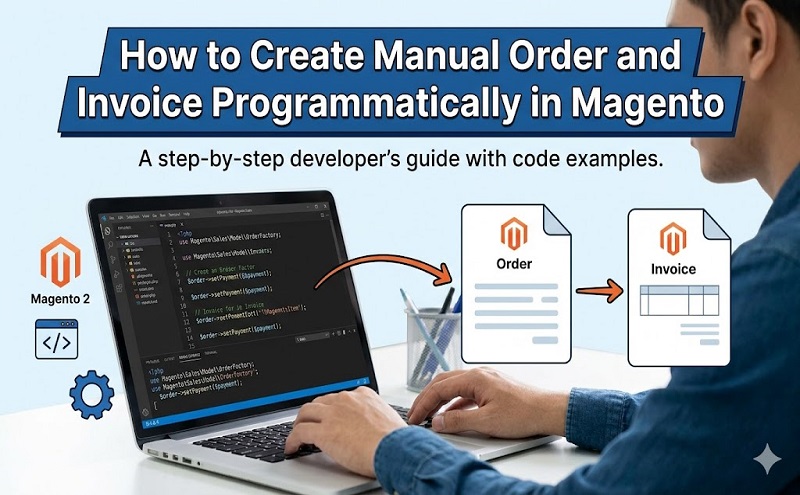
If you are using Magento platform for your eCommerce store and want to create manual order & invoice programmatically you might find this blog post helpful.
Few days ago, I required creating manual order programmatically for one of my project. I did some research but failed to find the expected solution and ended up doing it myself. It was not a complex job; you can easily do it if you have some Magento development skills. Now let me share the steps to get it done
Setp 1: First off you need to set Store Id by changing the code as below:
/* Set Store Id */
$storeId = 2; // Here 2 is Store Id
$storeInfo = Mage::getModel(‘core/store’)->load($storeId);
Step 2: Set your customer information / address and create customer if not exist. Do this by the following code:
// Set Customer Information /Address
$productId = 123; // Magento Product Id
$customer_email = “test@test.com”; // Customer Email Address
$customer_firstname = “First Name”;
$customer_lastname = “Last Name”;
$street = “Street Address”;
$city = “City”;
$region = “Region”;
$postcode = “Postcode”;
$telephone = “Telephone”;
$country_id = “Country Id”;
$customer_ip =“Customer Remote IP”;
// Check customer by website id
$customer = Mage::getModel(“customer/customer”);
$customer->setWebsiteId($storeInfo->getWebsiteId())->loadByEmail($customer_email);
// If store website not found, set admin store id
if(count($customer->getData())<=0){
$customer->setWebsiteId(Mage_Core_Model_App::ADMIN_STORE_ID)->loadByEmail($customer_email);
}
if(count($customer->getData())<=0){
$customer->setGroupId(1);
$customer->setEmail($customer_email);
$customer->setFirstname($customer_firstname);
$customer->setLastname($customer_lastname);
$customer->save();
}
Step 3: Declare sales quote model to create sales order. See the code below:
$quote = Mage::getModel(‘sales/quote’)->setStoreId($storeId);
Setp 4: Assign customer to the quote by the following code:
if(count($customer->getData())>0){
// For Existing Customer
$quote->assignCustomer($customer);
}else{
// For Guest Orders Only
$quote->setCustomerEmail($customer_email);
}
Final Step/ Step 5: This is the most important step which will execute the final process. You will get from this step assign product, assign billing/shipping address, assign payment method, create order and invoice. See the code below:
// Get Product data from Id
$_product = Mage::getModel(‘catalog/product’)->setStoreId($storeId)->load($productId);
if(count($_product->getData())>0){
// Assign product(s) to qoute
$buyInfo = array(‘qty’=>1,’product’=>$_product->getId());
$quote->addProduct($_product,new Varien_Object($buyInfo));
/* Check region for country */
$write = Mage::getSingleton(‘core/resource’)->getConnection(‘core_write’);
//Select Query
$query = $write->query(“SELECT * FROM `directory_country_region` WHERE `country_id`='”.$country_id.”‘”);
while($contry_data=$query->fetch()){
$has_country_region=true;
break;
}
if($has_country_region){
$addressData = array(
‘firstname’ => $customer_firstname,
‘lastname’ => $customer_lastname,
‘street’ => $street,
‘city’ => $city,
‘region_id’ =>$region,
‘postcode’ => $postcode,
‘telephone’ => $telephone,
‘country_id’ => $country_id
);
}else{
$addressData = array(
‘firstname’ => $customer_firstname,
‘lastname’ => $customer_lastname,
‘street’ => $street,
‘city’ => $city,
‘region’ =>$region,
‘postcode’ => $postcode,
‘telephone’ => $telephone,
‘country_id’ => $country_id
);
}
// Add Billing Address to qoute
$billingAddress = $quote->getBillingAddress()->addData($addressData);
// Assign payment method i.e Check or Money Order
$quote->getPayment()->importData(array(‘method’ => ‘checkmo’));
// Save quote data
$quote->collectTotals()->save();
$service = Mage::getModel(‘sales/service_quote’, $quote);
$service->submitAll();
$order = $service->getOrder();
if($customer_ip){
//Now set newly entered order’s remote IP.
$order->setRemoteIp($customer_ip);
//Finally we save our order after setting it’s IP.
$order->save();
if($order->getIncrementId()){
// Start Automatic Invoice Create
if(!$order->canInvoice()){
Mage::throwException(Mage::helper(‘core’)->__(‘Cannot create an invoice.’));
}
$invoice = Mage::getModel(‘sales/service_order’, $order)->prepareInvoice();
if (!$invoice->getTotalQty()) {
Mage::throwException(Mage::helper(‘core’)->__(‘Cannot create an invoice without products.’));
}
//$invoice->setRequestedCaptureCase(Mage_Sales_Model_Order_Invoice::CAPTURE_ONLINE);
$invoice->setRequestedCaptureCase(Mage_Sales_Model_Order_Invoice::CAPTURE_OFFLINE);
$invoice->register();
$transactionSave = Mage::getModel(‘core/resource_transaction’)
->addObject($invoice)
->addObject($invoice->getOrder());
$transactionSave->save();
}
N.B: This code will only work for virtual product. If you want to use it for others product just add shipping address and shipping method in final step.
That’s It, you should be good! If you try it in a different way I definitely would like to hear that,
Please feel free to contact us if you have any question or need support.