March 4, 2022 . 2 MIN READ
For Initialisation and Installation follow the steps from Alex his answer for most of the steps, only differences I would recommend:
Git configuration
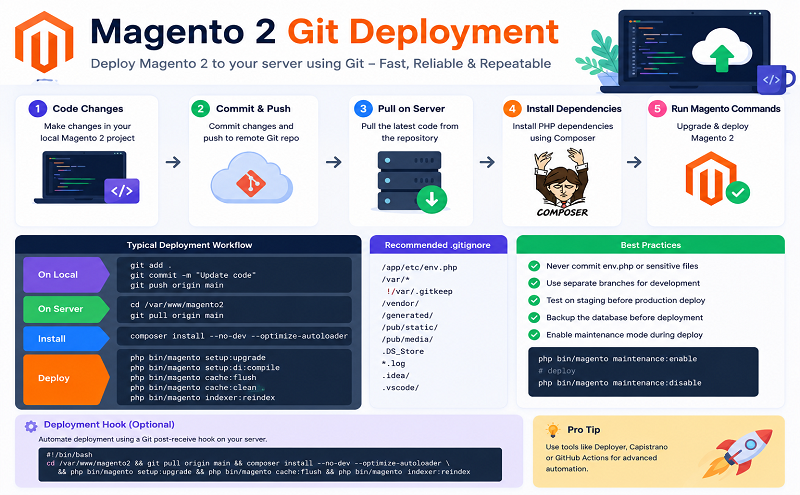
Only store the following files in your Git repository:
For your project custom code, also use separate modules that you include thru composer. Managing this thru composer is easier as you can lock a specific version/release that you want to deploy. This also forces you to use the same approach for internal and external modules.
Deployment
During development you update the modules on your environment (dev/test) with the command:
composer update
This will update the composer.lock file with the versions installed on that installation.
On staging/pre-production/production you can create/install the same setup with the command:
git pull
composer install
This will install all the same modules as used in dev/test to ensure that the testing before publishing to production is done with the same module versions as it is developed with.
After the installation to run the following commands:
bin/magento setup:upgrade
bin/magento setup:di:compile (or setup:di:compile-multi-tenant)
bin/magento setup:static-content:deploy
This will update the database (schema and data upgrade), generate the DI configuration and deploy all static view files.
frontend-setup steps
In order for these scripts to work set your shop to production mode in your env.php and setup your theme in dev/tools/grunt/configs/themes.js. (the following steps were put into an ansible playbook)
backend/di-setup steps
Reference: https://magento.stackexchange.com/questions/93622/git-and-deployment-strategy-magento2-projects