November 2, 2022 . 5 MIN READ
One of the key advantages of Amazon RDS is the ability to easily upgrade your database instance to a newer minor or major version of the database engine. These upgrades can be performed manually using the AWS Management Console or AWS CLI. You also have the option to enable automatic minor version upgrades, allowing Amazon RDS to update your instance when a new version becomes the preferred release.
Upgrading the engine version may also become necessary when the current version is deprecated. Deprecation typically occurs when a version is no longer supported or when known issues are resolved only in newer releases.
Although Amazon RDS simplifies the upgrade process, there are still several considerations to keep in mind for a smooth experience. This guide focuses on common upgrade considerations for MySQL and MariaDB engines on Amazon RDS, including:
What happens during an engine upgrade
Potential issues that may occur during the process
Methods to identify problems before upgrading
Strategies to minimize downtime using read replicas
Amazon RDS supports two types of engine upgrades:
Minor version upgrades – These update the minor version while keeping the same major version (for example, upgrading from 5.6.27 to 5.6.37).
Major version upgrades – These update both the major and minor versions (for example, upgrading from 5.6.27 to 5.7.19).
Minor upgrades typically include backward-compatible improvements and bug fixes. Because of this, they are generally faster and less risky. Major upgrades, however, may introduce compatibility changes and therefore can take longer to complete.
Another important rule is that major versions must be upgraded sequentially. For example, an instance running version 5.5 cannot jump directly to 5.7. It must first upgrade to 5.6, and then proceed to 5.7. In many cases, upgrades are limited to the latest supported target version.
When performing either a minor or major engine upgrade for MySQL or MariaDB, Amazon RDS follows several internal steps:
Create a snapshot (if backups are enabled) while the instance is still running the previous version.
Shut down the instance using a special slow shutdown process to maintain data consistency.
Restart the instance with the new engine version, initially with networking disabled to prevent external connections.
Run the mysql_upgrade utility to update system and user tables.
Execute RDS-specific scripts to upgrade AWS-managed tables and procedures.
Restart the instance again, this time enabling networking so applications can reconnect.
The main difference between minor and major upgrades is the role of the mysql_upgrade program. This tool checks every table in the database and ensures that the table structures are compatible with the new engine version. In most cases, only metadata updates are required, but occasionally tables must be rebuilt.
Minor upgrades typically complete in seconds to minutes, while major upgrades may take longer depending on the size and structure of the database.
Although upgrades usually run smoothly, several issues can occasionally arise.
During a standard shutdown, MySQL performs a fast shutdown, which skips some cleanup operations. However, during an upgrade Amazon RDS performs a slow shutdown by setting the innodb_fast_shutdown parameter to 0.
This ensures additional operations are completed, such as:
Flushing all modified pages from memory to disk
Merging the change buffer
Fully purging deleted rows
While this process helps avoid bugs after the upgrade, it can significantly increase shutdown time, especially for databases with large change buffers.
In rare cases, tables may contain latent corruption that remains unnoticed during normal workloads. These issues may only appear when the mysql_upgrade tool scans all tables.
If corruption is detected during this process, it can cause repeated crashes and prevent the upgrade from completing successfully.
Most upgrades do not require physical table reconstruction. However, certain major upgrades—such as moving to MySQL 5.7—may require rebuilding tables that contain temporal data types like:
TIME
DATETIME
TIMESTAMP
This occurs when older storage formats must be updated to newer formats that support additional features such as fractional seconds.
For small tables, rebuilds may only add a few minutes to the upgrade process. However, very large tables—especially on magnetic storage—may take hours or even days to rebuild.
Occasionally, upgrading to a new database version may introduce unexpected issues, such as:
Performance regressions
Query result inconsistencies
Database crashes due to engine bugs
Although Amazon RDS performs extensive compatibility testing, the underlying database engines are still largely based on the original software from Oracle MySQL or MariaDB, with only minimal modifications.
Major upgrades are generally more susceptible to such issues because they involve larger code changes.
The safest way to identify potential problems is to perform a test upgrade (dry run).
Amazon RDS makes this easy using features like:
Snapshot restores
Read replicas
By creating a copy of your production database and performing the upgrade there, you can:
Estimate how long the upgrade will take
Identify hidden corruption issues
Detect performance changes or regressions
When testing upgrades, it’s also recommended to prewarm the database instance. Newly restored instances may show high I/O latency. Running operations such as mysqldump (with output discarded) on frequently used tables can help warm up the system before testing.
You can also simulate production workloads to observe how the database behaves during shutdown and upgrade operations.
Running a dry run is strongly recommended before upgrading a production database.
In traditional database environments, administrators often reduce upgrade downtime using rolling upgrades with read replicas.
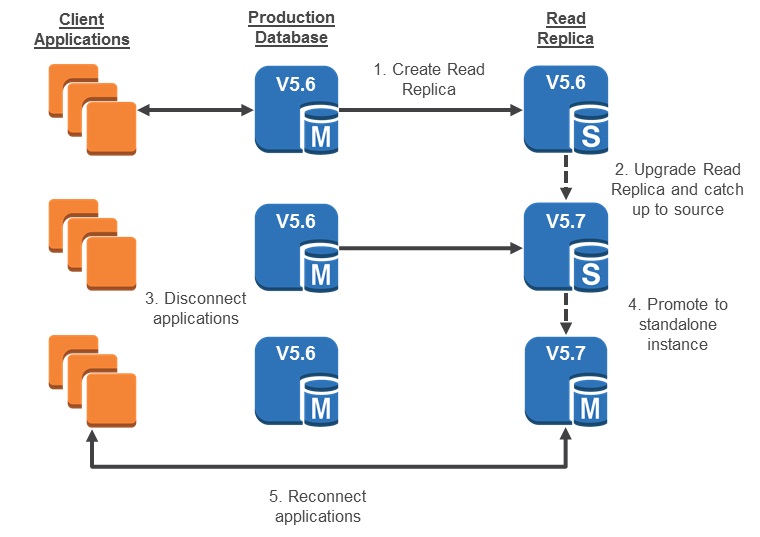
Amazon RDS does not provide a fully automated rolling upgrade feature, but you can still perform a similar process manually:
Create a read replica of the existing database.
Perform the engine upgrade on the replica.
Promote the upgraded replica to become the new primary instance.
Redirect application traffic to the newly promoted database.
This method allows you to minimize downtime during the upgrade process.
A common misconception is that Multi-AZ deployments eliminate downtime during upgrades.
While Multi-AZ improves availability during hardware failures or network outages, it does not completely prevent downtime during engine upgrades. The slow shutdown process and table modifications performed by mysql_upgrade still require temporary downtime.
Upgrading database engine versions is an important capability of Amazon RDS. Keeping your database up to date allows you to:
Access new database features
Improve performance
Reduce security and compatibility risks
Amazon RDS simplifies this process by allowing upgrades through the AWS Management Console or automatic version updates. However, it is still important to plan ahead, perform testing, and understand potential risks before upgrading production databases.
AWS continues to improve and streamline the RDS upgrade process, making database management easier and more reliable for customers.
Reference:
https://aws.amazon.com/blogs/database/best-practices-for-upgrading-amazon-rds-for-mysql-and-amazon-rds-for-mariadb/
https://blogs.halodoc.io/upgrading-to-rds-mysql-8-0-with-minimum-downtime/