
November 2, 2022 . 4 MIN READ
When launching a new database using AWS RDS, there are several instance options available. Selecting the right instance type helps ensure good performance while keeping costs under control. It’s also important to understand how features like Reserved Instances can reduce long-term database expenses.
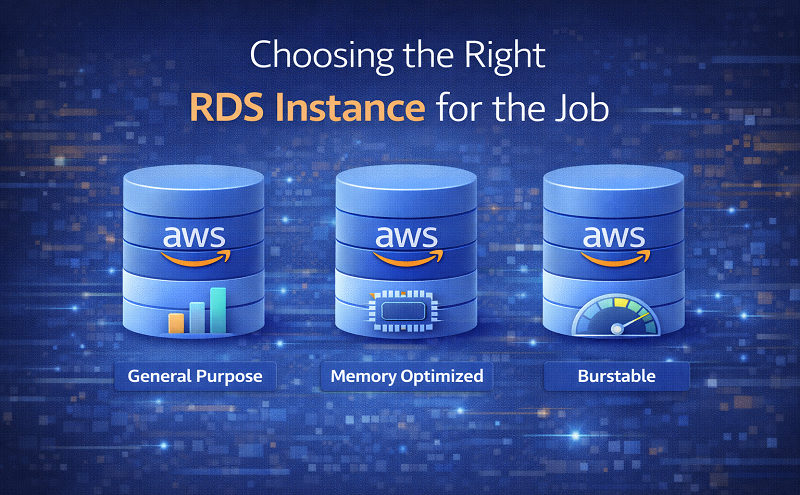
AWS RDS instances are similar to EC2 instances in that they are organized into different families, each designed for specific types of workloads. Traditionally, RDS instances fall into three main categories:
T2 Family – Designed for workloads that need burstable performance capacity.
M4 Family – Suitable for general-purpose database workloads.
R3 Family – Optimized for memory-intensive workloads, such as analytics, large datasets, or in-memory applications.
RDS also supports multiple database engines, including:
Amazon Aurora
MySQL
PostgreSQL
Oracle
SQL Server
MariaDB
Choosing the correct database instance is similar to choosing the right vehicle for a specific job. While a heavy-duty truck may work for commuting, it isn’t the most cost-effective option. Likewise, using a small car for construction work would be impractical.
Similarly, database infrastructure requirements vary depending on the application. A blog, e-commerce website, or basic web application typically has different requirements compared to a big data analytics platform or predictive modeling system.
For applications such as blogs, online stores, or simple applications, a T2 or M4 RDS instance is usually sufficient and cost-effective. Many teams begin with a T2 instance because it offers an affordable starting point and allows for occasional spikes in performance.
On the other hand, systems that run in-memory databases, advanced analytics, predictive models, or large-scale data visualization benefit from the additional memory available in R3 instances. These instances allow large working datasets to be stored in system memory, enabling faster interaction between the processor and RAM compared to standard storage. As a result, R3 instances often provide better cost efficiency for memory-heavy workloads.
While most RDS instances support a variety of database engines, Amazon Aurora—AWS’s MySQL- and PostgreSQL-compatible database service—is available only on certain instance types.
Aurora can run on R3 instances and the db.t2.medium instance type. If your project requires Aurora, you cannot use most M4 instances or other T2 sizes, except for db.t2.medium.
Some database workloads require high disk I/O performance. In such cases, Provisioned IOPS (PIOPS) can be enabled to improve input/output performance.
However, PIOPS is not available for T2 instances, and it is also unavailable on certain R3 instance sizes such as db.r3.large and db.r3.8xlarge. If your workload requires Provisioned IOPS, the M4 family or larger R3 instances may be better options.
Using Amazon RDS involves several cost components. Depending on the instance family and database engine used, users may be charged for:
Database instance hours
Storage
Backup storage
Data transfer
I/O requests (Aurora has separate pricing)
Provisioned IOPS (Aurora has different rates)
Understanding these cost factors helps determine which instance type delivers the best value for your workload.
Some organizations consider running their database directly on EC2 instances to reduce costs. In many cases, EC2 pricing may appear cheaper than RDS.
For example:
An EC2 m4.large instance running Linux might cost around $0.108 per hour.
An RDS db.m4.large instance running MySQL may cost about $0.175 per hour.
This means RDS costs roughly 38% more per hour in this example.
However, RDS significantly reduces the administrative burden of managing databases. AWS handles tasks such as:
Automated backups and snapshots
Database patching and updates
Monitoring key performance metrics
Simplified scalability and maintenance
For many organizations, these operational benefits justify the additional hourly cost compared to self-managed databases on EC2.
The following comparison illustrates the relative costs and performance characteristics of several RDS instance types running MySQL in the US West (Oregon) region.
| Instance Type | On-Demand Rate | vCPU Cost per Hour | Memory Cost per GB per Hour | PIOPS Support | Network Performance |
|---|---|---|---|---|---|
| db.t2.large | $0.136/hr | $0.068 | $0.017 | No | Moderate |
| db.m4.large | $0.175/hr | $0.0875 | $0.12 | Yes | Moderate |
| db.r3.large | $0.240/hr | $0.12 | $0.0157 | No | Moderate |
The db.r3.large instance is more expensive in terms of CPU cost but offers the best memory cost efficiency. The db.t2.large is cheaper than the db.m4.large, but its performance can decrease if burstable CPU credits are exhausted. Among these options, only the db.m4.large supports Provisioned IOPS.
Choose a T2 instance if:
You are starting a new project.
Your workload is small or moderate.
Occasional bursts in performance are expected.
You want a lower-cost option to test baseline database performance.
Keep in mind that Aurora is only supported on db.t2.medium, and T2 instances do not support Provisioned IOPS.
Choose an M4 instance if:
Your workload is general-purpose.
You do not rely heavily on in-memory processing.
You require the flexibility to configure Provisioned IOPS.
Choose an R3 instance if:
Your application relies heavily on memory.
You are running large datasets, analytics, or in-memory workloads.
Database instance costs are typically the largest component of RDS expenses. After identifying the most suitable instance type for your workload, you can reduce costs by purchasing Reserved Instances (RIs).
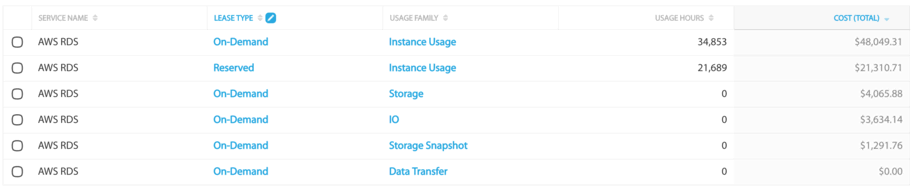
Reserved Instances allow you to commit to a one-year or three-year term in exchange for significantly lower hourly rates.
However, it is important to remember that purchasing Reserved Instances means committing to using the instance for every hour during the selected term. Monitoring your usage carefully ensures that Reserved Instances provide maximum cost savings.
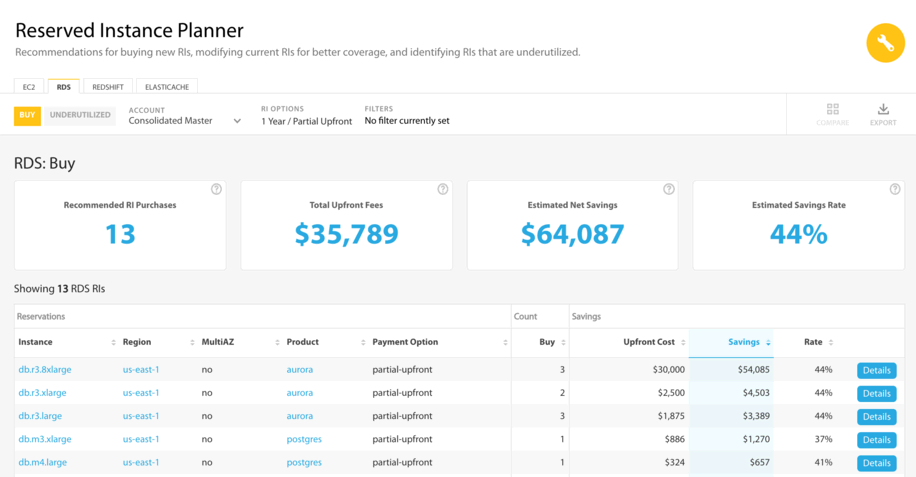
Using cloud cost management tools can help analyze usage patterns and determine whether additional Reserved Instances would be beneficial.
Reference:
https://www.apptio.com/blog/choosing-the-right-rds-instance-for-the-job/










