
July 9, 2021 . 7 MIN READ
If you are a web developer, you need to refer to various log files, in order to debug your application or improve its performance. Logs is the best place to start troubleshooting. Concerning the famous MySQLdatabase server (or MariaDB server), you need to refer to the following log files:
This article does not refer to The Binary Log. This requires very high standards server hardware and is useful only in special cases (e.g. replication, master – slaves setup, certain data recovery operations). Οtherwise, it is just a “performance killer”.
The official documentation about MySQL logs is available here.
Logging parameters are located under [mysqld] section.
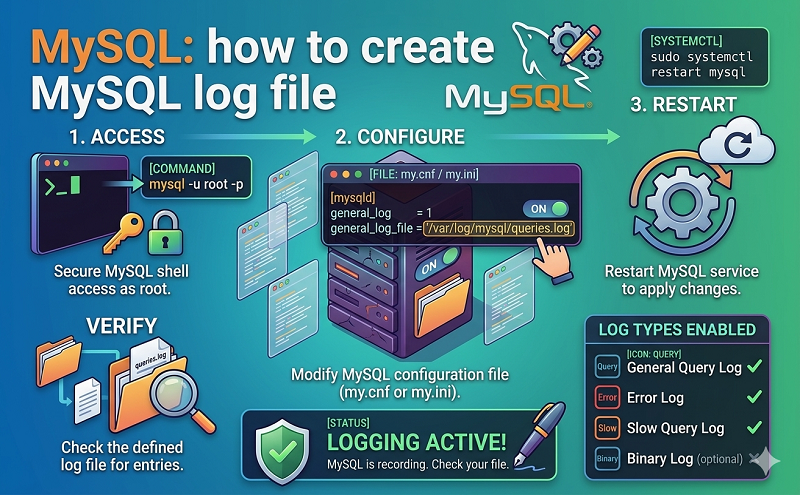
Edit MySQL configuration file:
| 1 | nano /etc/mysql/my.cnf |
This is the default setup for Logging and Replication (in Debian server). In other distributions the structure may be different, but you can always use MySQL server parameters:
| 1
2 3 4 5 6 7 8 9 10 11 12 13 14 15 16 17 18 19 20 21 22 23 24 |
# * Logging and Replication
# # Both location gets rotated by the cronjob. # Be aware that this log type is a performance killer. # As of 5.1 you can enable the log at runtime! #general_log_file = /var/log/mysql/mysql.log #general_log = 1 # # Error logging goes to syslog due to /etc/mysql/conf.d/mysqld_safe_syslog.cnf. # # Here you can see queries with especially long duration #log_slow_queries = /var/log/mysql/mysql-slow.log #long_query_time = 2 #log-queries-not-using-indexes # # The following can be used as easy to replay backup logs or for replication. # note: if you are setting up a replication slave, see README.Debian about # other settings you may need to change. #server-id = 1 #log_bin = /var/log/mysql/mysql-bin.log expire_logs_days = 10 max_binlog_size = 100M #binlog_do_db = include_database_name #binlog_ignore_db = include_database_name |
All log files are NOT enabled by default MySQL setup (except the error log on Windows). Default Debian setup sends Error log to syslog. The other log files are not enabled.
Error Log goes to syslog due to /etc/mysql/conf.d/mysqld_safe_syslog.cnf, which contains the following:
| 1
2 |
[mysqld_safe]
syslog |
This is the recommended method. If, for some reason, you do not want Error log to go to syslog, comment the above lines in /etc/mysql/conf.d/mysqld_safe_syslog.cnf or completely remove this file. Then, add in/etc/mysql/my.cnf the following lines:
| 1
2 3 4 5 |
[mysqld_safe]
log_error=/var/log/mysql/mysql_error.log
[mysqld] log_error=/var/log/mysql/mysql_error.log |
To enable General Query Log, uncomment (or add) the relevant lines
| 1
2 |
general_log_file = /var/log/mysql/mysql.log
general_log = 1 |
To enable Slow Query Log, uncomment (or add) the relevant lines
| 1
2 3 |
log_slow_queries = /var/log/mysql/mysql-slow.log
long_query_time = 2 log-queries-not-using-indexes |
This method requires a server restart.
| 1 | service mysql restart |
or, using systemd
| 1 | systemctl restart mysql.service |
Since MySQL 5.1 you can enable and disable logs at runtime.
To enable logs at runtime, login to mysql client (mysql -u root -p ) and give:
| 1
2 |
SET GLOBAL general_log = ‘ON’;
SET GLOBAL slow_query_log = ‘ON’; |
To disable logs at runtime, login to mysql client (mysql -u root -p ) and give:
| 1
2 |
SET GLOBAL general_log = ‘OFF’;
SET GLOBAL slow_query_log = ‘OFF’; |
This method works on any platform and does not require a server restart.
With the above settings, you can display Error log using
| 1 | tail -f /var/log/syslog |
REMARK: If you do not specify Error log file, MySQL keeps Error log at data dir (usually /var/lib/mysql in a file named {host_name}.err).
With the above settings, you can display General log using
| 1 | tail -f /var/log/mysql/mysql.log |
REMARK: If you do not define General log file, MySQL keeps General log at data dir (usually /var/lib/mysqlin a file named {host_name}.log).
With the above settings, you can display Slow Query log using
| 1 | tail -f /var/log/mysql/mysql-slow.log |
REMARK: If you do not specify Slow Query log file, MySQL keeps Slow Query log at data dir (usually/var/lib/mysql in a file named {host_name}-slow.log).
Do NOT ever forget to rotate logs. Otherwise, log files may become huge.
In Debian (and Debian derivatives as Ubuntu etc) log rotation using logrotate is already present after initial server setup (“Debian packages pre-configuration”).
| 1 | nano /etc/logrotate.d/mysql-server |
in other distributions, some changes may be needed
| 1
2 3 4 5 6 7 8 9 10 11 12 13 14 15 16 17 18 19 20 21 22 23 24 25 26 27 |
# – I put everything in one block and added sharedscripts, so that mysql gets
# flush-logs’d only once. # Else the binary logs would automatically increase by n times every day. # – The error log is obsolete, messages go to syslog now. /var/log/mysql.log /var/log/mysql/mysql.log /var/log/mysql/mysql-slow.log { daily rotate 7 missingok create 640 mysql adm compress sharedscripts postrotate test -x /usr/bin/mysqladmin || exit 0 # If this fails, check debian.conf! MYADMIN=”/usr/bin/mysqladmin –defaults-file=/etc/mysql/debian.cnf” if [ -z “`$MYADMIN ping 2>/dev/null`” ]; then # Really no mysqld or rather a missing debian-sys-maint user? # If this occurs and is not a error please report a bug. #if ps cax | grep -q mysqld; then if killall -q -s0 -umysql mysqld; then exit 1 fi else $MYADMIN flush-logs fi endscript } |
TIP: Use show variables like ‘%log%’; to examine your server variables related to log files
| 1
2 3 4 5 6 7 8 9 10 11 12 13 14 15 16 17 18 19 20 21 22 23 24 25 26 27 28 29 30 31 32 33 34 35 36 37 38 39 40 41 42 43 44 45 46 47 48 49 50 51 52 53 54 55 56 57 58 59 60 61 |
root@cosmos ~ # mysql -uroot -p
Enter password: Welcome to the MySQL monitor. Commands end with ; or \g. Your MySQL connection id is 144332 Server version: 5.5.31-0+wheezy1 (Debian)
Copyright (c) 2000, 2013, Oracle and/or its affiliates. All rights reserved.
Oracle is a registered trademark of Oracle Corporation and/or its affiliates. Other names may be trademarks of their respective owners.
Type ‘help;’ or ‘\h’ for help. Type ‘\c’ to clear the current input statement.
mysql> show variables like ‘%log%’; +—————————————–+——————————–+ | Variable_name | Value | +—————————————–+——————————–+ | back_log | 50 | | binlog_cache_size | 32768 | | binlog_direct_non_transactional_updates | OFF | | binlog_format | STATEMENT | | binlog_stmt_cache_size | 32768 | | expire_logs_days | 10 | | general_log | OFF | | general_log_file | /var/lib/mysql/cosmos.log | | innodb_flush_log_at_trx_commit | 1 | | innodb_locks_unsafe_for_binlog | OFF | | innodb_log_buffer_size | 8388608 | | innodb_log_file_size | 5242880 | | innodb_log_files_in_group | 2 | | innodb_log_group_home_dir | ./ | | innodb_mirrored_log_groups | 1 | | log | OFF | | log_bin | OFF | | log_bin_trust_function_creators | OFF | | log_error | | | log_output | FILE | | log_queries_not_using_indexes | OFF | | log_slave_updates | OFF | | log_slow_queries | OFF | | log_warnings | 1 | | max_binlog_cache_size | 18446744073709547520 | | max_binlog_size | 104857600 | | max_binlog_stmt_cache_size | 18446744073709547520 | | max_relay_log_size | 0 | | relay_log | | | relay_log_index | | | relay_log_info_file | relay-log.info | | relay_log_purge | ON | | relay_log_recovery | OFF | | relay_log_space_limit | 0 | | slow_query_log | OFF | | slow_query_log_file | /var/lib/mysql/cosmos-slow.log | | sql_log_bin | ON | | sql_log_off | OFF | | sync_binlog | 0 | | sync_relay_log | 0 | | sync_relay_log_info | 0 | +—————————————–+——————————–+ 41 rows in set (0.00 sec) |
Server variables official documentation is available here.
Using default MySQL setup, all log files are NOT enabled (except the error log on Windows). Default Debiansetup sends Error log to syslog.
Actually, there many situations where log files can provide solutions to critical problems:
Here is an example of MySQL General query log:
| 1
2 3 4 5 6 7 8 9 10 11 12 13 14 15 16 17 18 19 |
131021 17:43:50 43 Connect root@localhost as anonymous on pnet_blog
43 Init DB pnet_blog 43 Query SELECT count(id) as total_posts FROM posts WHERE date_published is not null AND date_published <= ‘20131021144350’ 43 Query SELECT * FROM posts WHERE date_published is not null AND date_published <= ‘20131021144350’ ORDER BY date_published DESC LIMIT 0,10 44 Connect root@localhost as anonymous on pnet_blog 44 Query SELECT id, title, impressions FROM tips WHERE date_published IS NOT NULL AND date_published <= ‘20131021144350’ ORDER BY date_published DESC LIMIT 0, 10 44 Quit 43 Quit 131021 17:44:28 45 Connect root@localhost as anonymous on pnet_blog 45 Init DB pnet_blog 45 Query SELECT * FROM posts WHERE url=’how-and-when-to-enable-mysql-logs’ 45 Query UPDATE posts SET impressions=impressions+1 WHERE id=’41’ 45 Query SELECT url, post_title FROM posts WHERE date_published IS NOT NULL AND date_published < ‘20131020150000’ ORDER BY date_published DESC LIMIT 0,1 45 Query SELECT url, post_title FROM posts WHERE date_published IS NOT NULL AND date_published > ‘20131020150000’ ORDER BY date_published ASC LIMIT 0,1 45 Query SELECT * FROM posts WHERE date_published is not null AND date_published <= ‘20131021144428’ AND date_published >= ‘20130421144428’ ORDER BY impressions DESC LIMIT 0,10 46 Connect root@localhost as anonymous on pnet_blog 46 Query SELECT id, title, impressions FROM tips WHERE date_published IS NOT NULL AND date_published <= ‘20131021144428’ ORDER BY date_published DESC LIMIT 0, 10 46 Quit 45 Quit |










