Introduction
Some PHP scripts require a long execution time to complete without interruption. This is common with tasks such as WordPress plugins like BackupBuddy, ImportBuddy, or other tools that depend on WordPress’s built-in cron jobs. Similarly, operations like rebuilding MySQL indexes can also take a significant amount of time to finish.
In most cases, allowing a PHP script to run indefinitely is not recommended. For this reason, both LiteSpeed Web Server (LSWS) and PHP include built-in mechanisms that may terminate long-running scripts before they finish. However, when certain scripts must run without interruption, you can configure LiteSpeed settings such as noabort to prevent the server from stopping them prematurely.
Simple Solution
The easiest way to prevent long-running PHP scripts from being aborted is to add the following configuration to the top of the domain’s .htaccess file located in the document root:
RewriteEngine On
RewriteRule SCRIPT_URL – [E=noabort:1, E=noconntimeout:1]
</IfModule>
Replace SCRIPT_URL with the actual URL path of the script that needs extended execution time.
⚠️ Important:
Although it may seem convenient to apply noabort to all requests using .*, this approach is strongly discouraged. Doing so can lead to unintended consequences, such as server resource exhaustion. For example, on systems using CloudLinux Lightweight Virtual Environment (LVE), the server could become overloaded because LiteSpeed would no longer terminate problematic external application requests.
For best results, apply noabort only to specific scripts that truly require it.
Disabling Broken Connection Aborting
Normally, if a user closes a browser tab or disconnects while a request is still processing, LiteSpeed terminates the related PHP process. This helps conserve system resources and protects against certain types of denial-of-service attacks.
However, there are scenarios where the script should continue running even if the connection is closed. For instance, WordPress cron jobs often trigger background tasks by sending a request to wp-cron.php and immediately closing the connection. If the server stops the script when the connection ends, the cron task will not complete.
In such cases, broken connection aborting must be disabled either through LiteSpeed’s WebAdmin Console or by using the noabort environment variable.
Using Environment Variables
LiteSpeed provides a request-level environment variable called noabort that can prevent a script from being terminated when the client disconnects. This variable can be configured using rewrite rules or SetEnv directives within LiteSpeed-specific configuration blocks.
Example configuration:
SetEnvIf Request_URI “(wp-cron|backupbuddy|importbuddy)\.php” noabort
</IfModule>
Alternatively, a rewrite rule can achieve the same result:
RewriteRule (wp-cron|backupbuddy|importbuddy)\.php – [E=noabort:1]
This configuration ensures that WordPress cron jobs and certain backup scripts can run uninterrupted.
Expanding the Scope Carefully
While it is not recommended to apply noabort globally, you can broaden its usage with conditional logic. For example, you might enable it for WordPress cron scripts or specific admin requests while keeping the rest of the site unaffected.
Example configuration:
<IfModule mod_rewrite.c>
RewriteEngine On
RewriteRule ^wp-cron.php$ – [E=noabort:1]
RewriteCond %{REQUEST_URI} ^(.*)?wp-admin
RewriteCond %{HTTP_COOKIE} ^.*wordpress_logged_in_.*$
RewriteRule .* – [E=noabort:1]
</IfModule>
</IfModule>
This setup applies noabort to WordPress cron tasks and certain admin requests when a user is logged in.
Rewrite Rules vs. Directives
There are two main ways to configure noabort: using rewrite rules or directives.
Rewrite Rules
-
Can be added to
.htaccessor virtual host configuration files. -
Must be placed at the top of the configuration file for best results.
-
Typically used for individual accounts.
Directives (SetEnv / SetEnvIf)
-
Can appear anywhere in the configuration file.
-
Not dependent on rule order.
-
Can be applied globally across multiple accounts.
In most cases, SetEnv directives are the preferred approach.
Adjusting Connection Timeouts
Sometimes a script may appear inactive for a long period, triggering a connection timeout and causing the server to close the connection. This safeguard prevents poorly written scripts from consuming server resources indefinitely.
To avoid this issue for specific scripts, you can increase the global connection timeout through the WebAdmin Console or use LiteSpeed’s noconntimeout environment variable.
Example configuration combining both options:
Or using a rewrite rule:
RewriteRule (wp-cron|backupbuddy|importbuddy)\.php – [E=noabort:1, E=noconntimeout:1]
Adjusting LSAPI Processing Time
In ProcessGroup mode, LiteSpeed uses the LSAPI_MAX_PROCESS_TIME variable to determine how long a request can run before it is terminated. The default value is 3600 seconds.
You can increase this value through the WebAdmin Console:
This example allows scripts to run for up to 24 hours.
Modifying PHP Execution Time
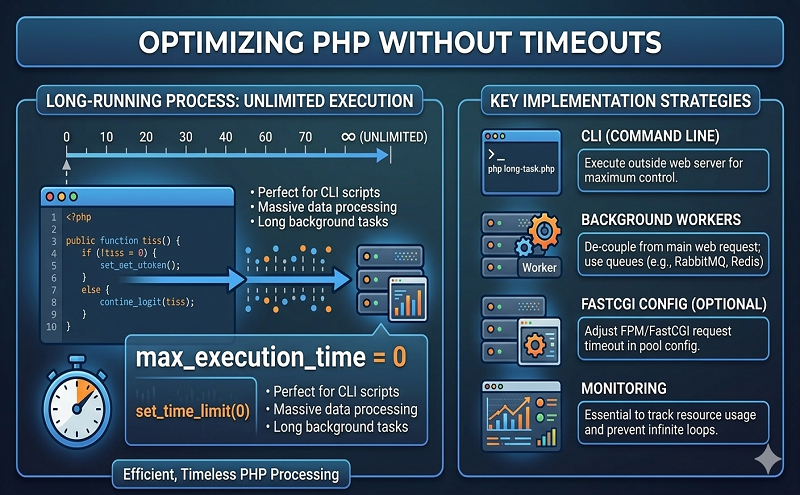
PHP itself also limits how long a script can run using the max_execution_time setting in the php.ini file. The default value is 30 seconds.
Example configuration:
This increases the maximum execution time to 10 hours.
Using PHP Code to Prevent Timeouts
Another method is to modify the PHP script itself to allow it to continue processing even after the user disconnects. The following example demonstrates how a script can send a response to the browser and then continue running a background task.
ignore_user_abort(true);
ob_start();
echo “Processing…”;
session_write_close();
header(“Content-Length: “.ob_get_length());
header(“Connection: close”);
ob_end_flush();
flush();
ob_start();
sleep(50);
ob_end_clean();
?>
This approach allows the server to continue executing background tasks even after the client connection ends.
Conclusion
Long-running PHP scripts can be interrupted by several built-in limits in LiteSpeed and PHP. While these restrictions help maintain server stability, certain applications—such as WordPress cron jobs or database maintenance tasks—require extended execution time.
By carefully configuring LiteSpeed settings like noabort, noconntimeout, adjusting LSAPI processing limits, or modifying PHP execution settings, you can ensure that essential scripts complete successfully without compromising server performance.