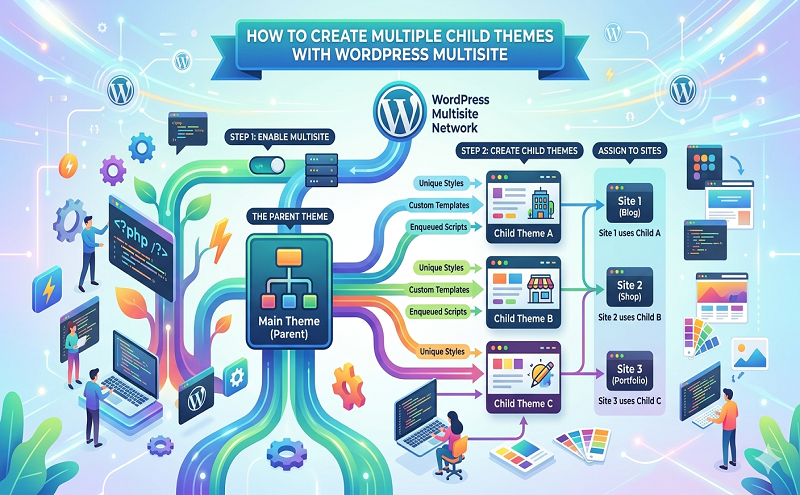
If you are working with WordPress, it is always best practice to use child themes if you want to make any changes to your theme. This post explains how to use multiple child themes with WordPress Multisite.
What is a child theme you ask? A child theme is essentially a theme which inherits the functions and look and feel of a “parent theme”. Any changes you make to the child theme do not affect the parent theme, but you still maintain the functions of the parent theme.
You can think of it like a hierarchy. The parent and child themes have the same functionality as the parent, but the child can have its own specialised functions as well.
This is useful because any changes you make are not potentially overwritten when an update to the parent theme is released by the developers.
WordPress Multisite Child Themes
If you are using WordPress Multisite, you can of course use the same child theme for some or all of your collection of sites on your multisite network.
I assume you already know how to use Multisite if you have found this blog post, but if you aren’t familiar, check out the official WordPress documentation on how to create a network.
But what if you want to make specific theme changes to individual sites within your Multisite network, but still use your child themes (without those changes affecting your other sites using the same child theme)?
This post explains how you can easily make copies of a child theme, make any necessary changes in the new copy of the child theme, and then use the copy as the active theme on your site.
Pros and Cons of Multiple WordPress Multisite Child Themes
There are pros and cons of using this method to create multiple child themes. Although it is extremely easy to make a copy of a child theme, any changes that you make in one copy won’t affect the other copies. This can be a pro or a con depending on your requirements.
If you want to make a change to a theme for a couple of sites on your Multisite network, you have two options.
You can either make the same code changes multiple times on each child theme (not efficient and annoying to maintain), or you can make all the changes in one child theme and then make a copy of it and activate on your desired sites.
You may be asking yourself – can you make a child theme of a child theme? The reason we do it like this is because it is not really possible to make a child theme of a child theme (“grandchild” theme).
How to Make Copies of WordPress Child Themes
Let’s say you are using a child theme on your multisite network called “Hello Elementor Child“. This is the default name of the child theme for the Hello Elementor theme.