
July 14, 2021 . 6 MIN READ
https://stackshare.io/stackups/bitbucket-vs-github-vs-gitlab
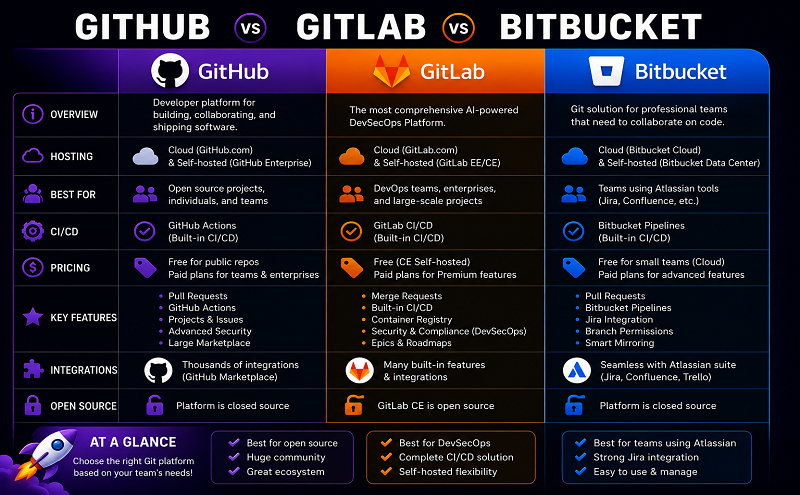
At some point in any software project, you will need to share your code with other developers. If you’re using Git for source control, there are three primary options: Github, Bitbucket, or Gitlab. Understanding the differences and tradeoffs between these three repository management platforms is vital to choosing the best option for your team.
One of the core features in any team-based version control platform is the pull request process. This typically happens when a team member completes a new feature and wants to get their code merged into the development or production branch of the codebase.

The feature to be merged will typically be reviewed by another developer during a code review process, and they may want to use the pull request (called “merge request” in Gitlab) feature included in the repository management platform. Let’s take a look at the differences between Github, Bitbucket, and Gitlab in this area.
The pull request process in Github is designed with team-based projects in mind. In order to facilitate that workflow, Github provides some interesting features:
Bitbucket’s pull requests are similar, although they do not offer quite as many features. Bitbucket does offer everything you need though:
While named differently, Gitlab merge requests work pretty much the same way as pull requests. You get most of the same core features:
One usablity difference in Gitlab is that you have to make a couple clicks to get to the diff of changes – they aren’t shown by default.
While Github’s pull request process has the most unique features, it may be distracting if your team doesn’t need all of them. Creating a sustainable, repeatable workflow is often better than trying to do everything.
Another common use case for repository hosting platforms is to trigger continuous integration, or continuous deployment. Typically teams will use other services to manage these tasks, so the ability to link their source control repository with third party services is another core feature of Github, Bitbucket, and Gitlab.
Github’s marketplace recently underwent an overhaul, so they now have two places for integrations with third party tools: the Github Marketplace and Works with Github. Marketplace is smaller, but it allows third party applications to actually sell services through Github. Works with Github boasts several hundred integrations with other existing services. Github also has a robust REST API if you need to create your own custom integrations.
Bitbucket is owned by Atlassian so if you use Jira or Bamboo you may appreciate Bitbucket’s built-in integrations. Bitbucket also has a robust app marketplace, and an API that allows you to build your own integrations. It’s also worth noting that Bitbucket has its own Pipelines tool that can do your continuous integration and delivery for you.
While Gitlab has fewer built-in integrations (20 are listed in the admin documentation) than either Github or Bitbucket, it is open source, meaning that any part of the code can be customized. This is rarely a necessity though as they also provide a robust plugin system and REST API. You can even customize the login page and user interface to project your team’s personality or company’s brand. Gitlab also offers its own continuous integration tool built into the platform.
Github is the most popular source control management tool for open source projects because it’s also great for visibility. Projects hosted on Github can have their own public-facing issues, projects, teams, and pull requests. They’re also searchable, and may be featured in Github’s daily or weekly newsletter. Github includes a free hosting solution for static sites, so open source projects can serve up their documentation or landing pages for free on the platform.
Gitlab offers a most starred list, search feature, and free static site hosting, but they do not offer quite as many features for user profiles. For example, you cannot follow users on Gitlab like you can on Github.
Finally, Bitbucket has the option to create public repositories, but they do not currently offer a search feature. Bitbucket’s user profiles are also anaemic, and their static site hosting doesn’t allow custom domain names.
Sometimes public visibility isn’t a feature you want though. For example, some teams want source control to be completely locked down to a private network. In this case, you should consider whether or not your repository hosting platform can be self-hosted. In this case, Github, Gitlab, and Bitbucket all offer self-hosted versions of their product, but the pricing varies quite a bit.
Pricing for all three of these repository management platforms is available in two flavors: cloud-hosted and self-hosted.
If your organization is able to use the lowest-tier cloud-hosted version of each platform, your costs will typically grow as a function of team size and whether or not the code you’re hosting is open source.

*Note: Github also includes a $7/month plan for individuals who want private repositories.
Each platform offers slightly different offerings at higher price points. For example, Github offers a 99.95% uptime SLA and 24/5 tech support starting at $21 per user per month, Bitbucket offers security features like IP whitelisting and required two-step verification starting at $5 per user per month, and Gitlab will give you more CI build minutes and a host of project management features for $19 per user per month. Bitbucket and Gitlab offer free trials if you think you might need some of these premium features.
Once your needs get more complex, I’d recommend checking out each provider’s hosting page to do your own comparison:
All three of these services also offers a self-hosted option – typically for enterprise customers or users with special security requirements.

While Github and Bitbucket offer self-hosting, only Gitlab is open source, which allows its self-hosted option to be the cheapest. That said, you may want additional support support,, so be sure to check out the pricing pages above to make sure you’re getting the best plan for your needs.
GitHub vs Bitbucket vs GitLab: What are the differences?
GitHub, Bitbucket, and GitLab are code collaboration and version control tools offering repository management. They each have their share of fans, though GitHub is by far the most-used of the three. Of the three, only GitLab is open source, though all three support open source projects. GitHub offers free public repositories; Bitbucket also offers free private repositories; GitLab offers a Community Edition which is entirely free.


GitHub Enterprise

Bitbucket
We are using a Bitbucket server, and due to migration efforts and new Atlassian community license changes, we need to move to a new self-hosted solution. The new data-center license for Atlassian, available in February, will be community provisioned (free). Along with that community license, other technologies will be coming with it (Crucible, Confluence, and Jira). Is there value in a paid-for license to get the GitHub Enterprise? Are the tools that come with it worth the cost?
I know it is about $20 per 10 seats, and we have about 300 users. Have other convertees to Microsoft’s tools found it easy to do a migration? Is the toolset that much more beneficial to the free suite that one can get from Atlassian?
So far, free seems to be the winner, and the familiarization with Atlassian implementation and maintenance is understood. Going to GitHub, are there any distinct challenges to be found or any perks to be attained?










