https://stackoverflow.com/questions/7881469/change-key-pair-for-ec2-instance
Instruction from AWS EC2 support:
- Change pem login
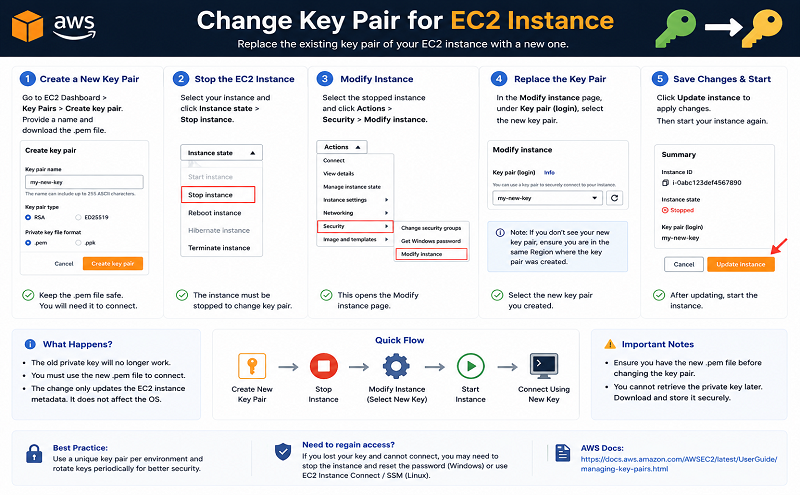
- go to your EC2 Console
- Under NETWORK & SECURITY, click on Key Pair Click on Create Key Pair
- Give your new key pair a name, save the .pem file. The name of the key pair will be used to connect to your instance
- Create SSH connection to your instance and keep it open
- in PuttyGen, click “Load” to load your .pem file
- Keep the SSH-2 RSA radio button checked. Click on “Save private key” You’ll get pop-up window warning, click “Yes”
- click on “Save public key” as well, so to generate the public key. This is the public key that we’re going to copy across to your current instance
- Save the public key with the new key pair name and with the extension .pub
- Open the public key content in a notepad
- copy the content below “Comment: “imported-openssh-key” and before “—- END SSH2 PUBLIC KEY —-
Note – you need to copy the content as one line – delete all new lines
- on your connected instance, open your authorized_keys file using the tool vi. Run the following command: vi .ssh/authorized_keys you should see the original public key in the file also
- move your cursor on the file to the end of your first public key content :type “i” for insert
- on the new line, type “ssh-rsa” and add a space before you paste the content of the public key , space, and the name of the .pem file (without the .pem) Note – you should get a line with the same format as the previous line
- press the Esc key, and then type :wq!
this will save the updated authorized_keys file
now try open a new SSH session to your instance using your new key pai
When you’ve confirmed you’re able to SSH into the instance using the new key pair, u can vi .ssh/authorized_key and delete the old key.
Answer to Shaggie remark:
If you are unable to connect to the instance (e.g. key is corrupted) than use the AWS console to detach the volume (http://docs.aws.amazon.com/AWSEC2/latest/UserGuide/ebs-detaching-volume.html) and reattach it to working instance, than change the key on the volume and reattach it back to the previous instance.