July 13, 2021 . 7 MIN READ
https://docs.aws.amazon.com/AWSEC2/latest/UserGuide/ri-convertible-exchange.html
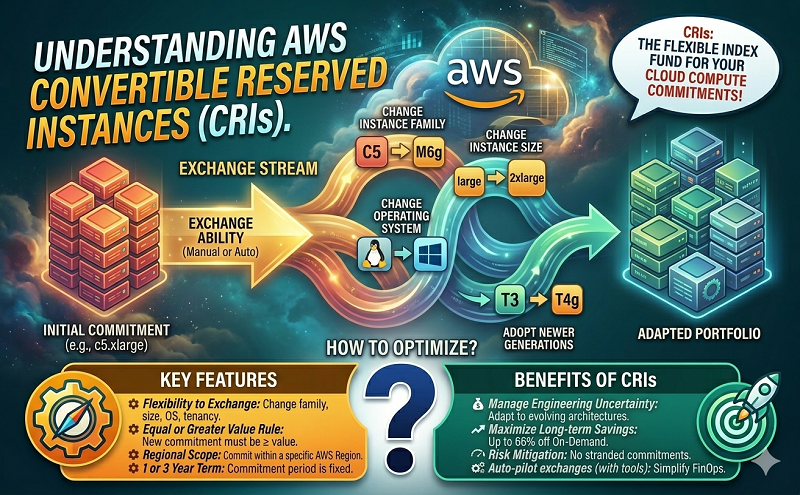
You can exchange one or more Convertible Reserved Instances for another Convertible Reserved Instance with a different configuration, including instance family, operating system, and tenancy. There are no limits to how many times you perform an exchange, as long as the new Convertible Reserved Instance is of an equal or higher value than the original Convertible Reserved Instances that you are exchanging.
When you exchange your Convertible Reserved Instance, the number of instances for your current reservation is exchanged for a number of instances that cover the equal or higher value of the configuration of the new Convertible Reserved Instance. Amazon EC2 calculates the number of Reserved Instances that you can receive as a result of the exchange.
You can’t exchange Standard Reserved Instances, but you can modify them. For more information, see Modify Reserved Instances .
Contents
If the following conditions are met, Amazon EC2 processes your exchange request. Your Convertible Reserved Instance must be:
The following rules apply:
If the total upfront payment required for the exchange (true-up cost) is less than $0.00, AWS automatically gives you a quantity of instances in the Convertible Reserved Instance that ensures that true-up cost is $0.00 or more.
If the total value (upfront price + hourly price * number of remaining hours) of the new Convertible Reserved Instance is less than the total value of the exchanged Convertible Reserved Instance, AWS automatically gives you a quantity of instances in the Convertible Reserved Instance that ensures that the total value is the same or higher than that of the exchanged Convertible Reserved Instance.
If the total value (hourly price * number of remaining hours) of the new Convertible Reserved Instance is less than the total value of the exchanged Convertible Reserved Instance, AWS automatically gives you a quantity of instances in the Convertible Reserved Instance that ensures that the total value is the same or higher than that of the exchanged Convertible Reserved Instance.
Exchanging Convertible Reserved Instances is free. However, you might be required to pay a true-up cost, which is a prorated upfront cost of the difference between the original Convertible Reserved Instances that you had and the new Convertible Reserved Instances that you receive from the exchange.
Each Convertible Reserved Instance has a list value. This list value is compared to the list value of the Convertible Reserved Instances that you want in order to determine how many instance reservations you can receive from the exchange.
For example: You have 1 x $35-list value Convertible Reserved Instance that you want to exchange for a new instance type with a list value of $10.
$35/$10 = 3.5You can exchange your Convertible Reserved Instance for three $10 Convertible Reserved Instances. It’s not possible to purchase half reservations; therefore you must purchase an additional Convertible Reserved Instance to cover the remainder:
3.5 = 3 whole Convertible Reserved Instances + 1 additional Convertible Reserved InstanceThe fourth Convertible Reserved Instance has the same end date as the other three. If you are exchanging Partial or All Upfront Convertible Reserved Instances, you pay the true-up cost for the fourth reservation. If the remaining upfront cost of your Convertible Reserved Instances is $500, and the new reservation would normally cost $600 on a prorated basis, you are charged $100.
$600 prorated upfront cost of new reservations - $500 remaining upfront cost of original reservations = $100 differenceIf you merge two or more Convertible Reserved Instances, the term of the new Convertible Reserved Instance must be the same as the original Convertible Reserved Instances, or the highest of the original Convertible Reserved Instances. The expiration date for the new Convertible Reserved Instance is the expiration date that’s furthest in the future.
For example, you have the following Convertible Reserved Instances in your account:
| Reserved Instance ID | Term | Expiration date |
|---|---|---|
| aaaa1111 | 1-year | 2018-12-31 |
| bbbb2222 | 1-year | 2018-07-31 |
| cccc3333 | 3-year | 2018-06-30 |
| dddd4444 | 3-year | 2019-12-31 |
aaaa1111 and bbbb2222 and exchange them for a 1-year Convertible Reserved Instance. You cannot exchange them for a 3-year Convertible Reserved Instance. The expiration date of the new Convertible Reserved Instance is 2018-12-31.bbbb2222 and cccc3333 and exchange them for a 3-year Convertible Reserved Instance. You cannot exchange them for a 1-year Convertible Reserved Instance. The expiration date of the new Convertible Reserved Instance is 2018-07-31.cccc3333 and dddd4444 and exchange them for a 3-year Convertible Reserved Instance. You cannot exchange them for a 1-year Convertible Reserved Instance. The expiration date of the new Convertible Reserved Instance is 2019-12-31.You can use the modification process to split your Convertible Reserved Instance into smaller reservations, and then exchange one or more of the new reservations for a new Convertible Reserved Instance. The following examples demonstrate how you can do this.
Example: Convertible Reserved Instance with multiple instances
In this example, you have a t2.micro Convertible Reserved Instance with four instances in the reservation. To exchange two t2.micro instances for an m4.xlarge instance:
t2.micro Convertible Reserved Instance by splitting it into two t2.micro Convertible Reserved Instances with two instances each.t2.micro Convertible Reserved Instances for an m4.xlarge Convertible Reserved Instance.
Example: Convertible Reserved Instance with a single instance
In this example, you have a t2.large Convertible Reserved Instance. To change it to a smaller t2.medium instance and a m3.medium instance:
t2.large Convertible Reserved Instance by splitting it into two t2.medium Convertible Reserved Instances. A single t2.large instance has the same instance size footprint as two t2.medium instances.t2.medium Convertible Reserved Instances for an m3.medium Convertible Reserved Instance.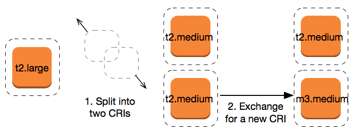
For more information, see Support for modifying instance sizes and Submit exchange requests.
You can exchange your Convertible Reserved Instances using the Amazon EC2 console or a command line tool.
You can search for Convertible Reserved Instances offerings and select your new configuration from the choices provided.
To exchange Convertible Reserved Instances using the Amazon EC2 console
The Reserved Instances that were exchanged are retired, and the new Reserved Instances are displayed in the Amazon EC2 console. This process can take a few minutes to propagate.
To exchange a Convertible Reserved Instance, first find a new Convertible Reserved Instance that meets your needs:
Get a quote for the exchange, which includes the number of Reserved Instances you get from the exchange, and the true-up cost for the exchange:
Finally, perform the exchange: