July 7, 2021 . 1 MIN READ
When you are working on two different servers, sometimes you need to communicate from one server to other server using php file OR in simple words you need to execute a php file on other server staying on a local or another server.
Doing so is not a difficult task. you can do it easily following these steps
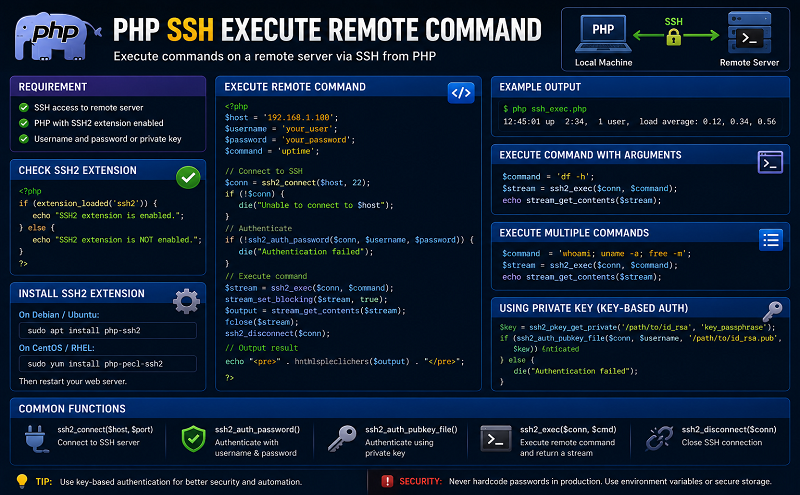
You need to install php-ssh2 library which provides access to resources (shell, remote exec, tunnelling, file transfer) on a remote machine using a secure cryptographic transport.
to install it –
 $ sudo apt-get update
 $ sudo apt-get install php-ssh2
Now your server is ready to execute a file on any other server.
create a .php file on your current server like this-
<?php
/*server.php*/
$connection_string = ssh2_connect(address_to_server, 22);

// $connection_string = ssh2_connect('127.0.0.1', 22);

if (@ssh2_auth_password($connection_string, 'user', 'password'))
{
	echo "Authentication Successful!\n";
}
else
{
	throw new Exception("Authentication failed!");
}

$stream = ssh2_exec($connection_string, 'php /path to your php file');
stream_set_blocking($stream, true);
$stream_out = ssh2_fetch_stream($stream, SSH2_STREAM_STDIO);
echo stream_get_contents($stream_out);
and save this file.
now execute this file as
$ php server.php
If it output Authentication Successful! You are ready to execute further.
http://acmeextension.com/execute-php-file-remote-server-using-ssh/
https://www.sitepoint.com/using-ssh-and-sftp-with-php/